Moodle 5.2 was released on April 20, 2026. It’s a standard support version (18 months), with nothing new to make a splash, but it’s a dense and busy version: multi-correction homework, a question bank, new AI providers in the core, an overhaul of the user experience on many levels, and the React foundations laid for good. These structuring choices will influence the next two or three versions of Moodle.
At Pimenko, we’ve sifted through the release notes, tested on our development platforms with courses, analyzed the official tickets to bring you as complete an overview as possible, organized by profile. Whether you’re a teacher, system administrator or plugin developer, you’ll find everything you need here.
And for those still on the LTS: all these features will be in Moodle 5.3 (October 2026). Following what’s new in Moodle 5.2 means preparing for the next LTS release.
What Moodle 5.2 changes for teachers
If you’re designing courses, assessing learners or running learning activities, this release brings you several enhancements. The most important: you can assign the correction of a “homework” activity to several assessors.
But there’s also stuff on the question bank, sub-sections and forums.
The big news: several assessors per assignment
This is one of the long-awaited innovations for higher education establishments and training organizations faced with team grading: assignments can now be assigned to several graders in parallel, with a complete process adapted to all.
In this video, we show you the entire process: from setting up the assignment to publishing the grade.
These new features make it possible to adapt to different organizations and processes for managing multiple assessments. It is possible :
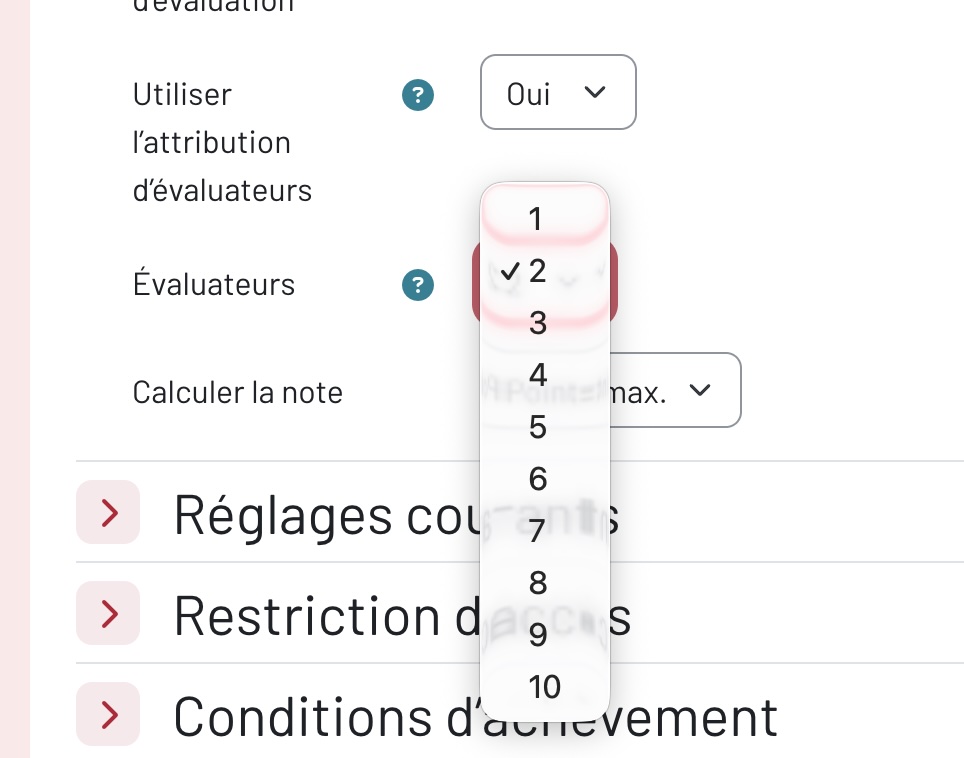
- Set the number of graders per assignment: the default number is defined at site level in Admin > Plugins > Assignments and can be customized for each assignment.
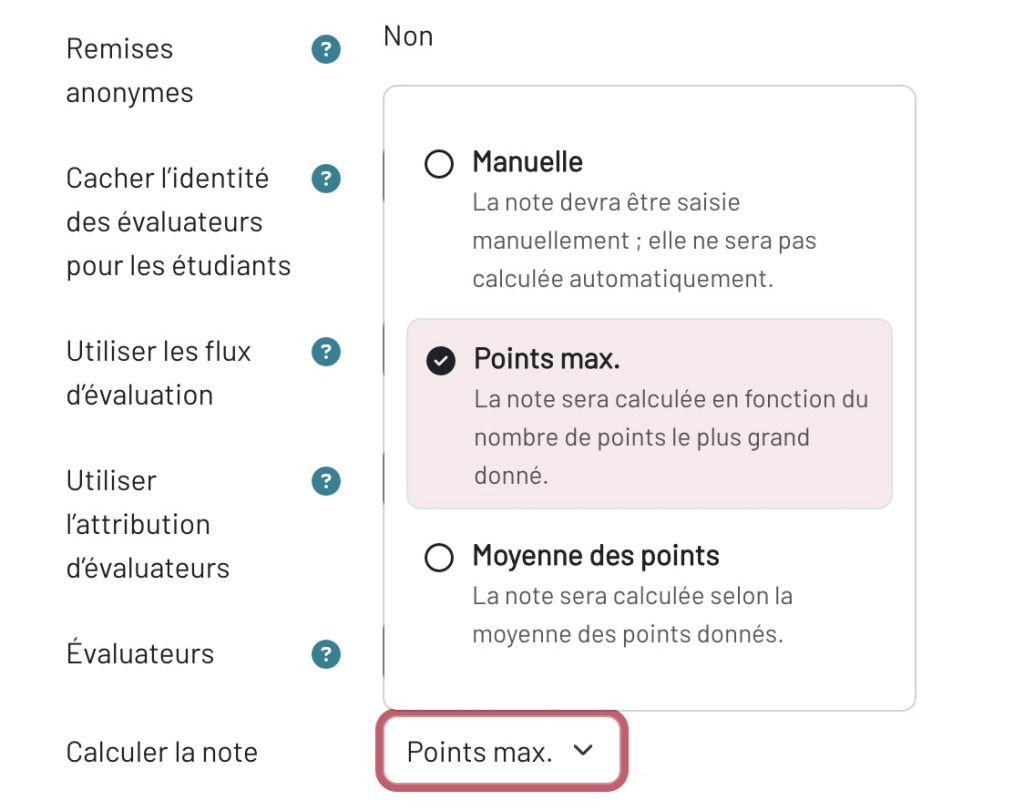
- Choose calculation method: manual, maximum points (highest number of points given), or average of scores
- Assign graders: assign each student to a grader one by one, or en masse for selected learners
Mass assignment of evaluators to learners
With this process and its various options, homework activities can be graded and corrected by several assessors, while remaining flexible enough to adapt to any organization.
Note: MoodleHQ refers to this as “Phase 1”, as the functionality is intended to be developed further.
Exemption for homework, quizzes and lessons
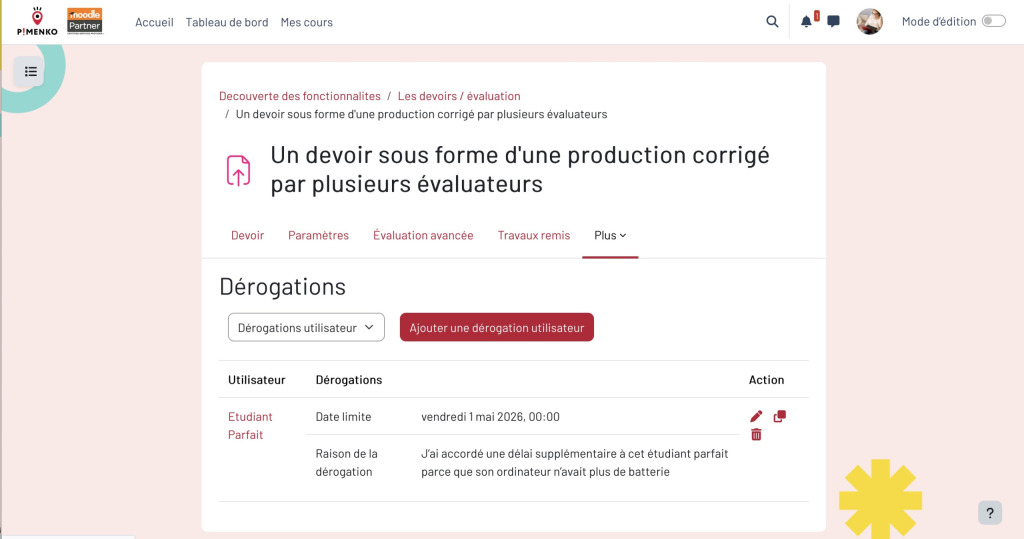
Small but useful: it is now possible to add a text note when a date or attempt is waived for a student or group in assessment activities.
No need to write in an external file “I gave this perfect student an extra attempt because his computer ran out of battery”: it’s traceable directly in Moodle.
Question bank: even more professional
Moodle 5.2 marks a new stage in the development of the question bank. If you manage a bank with thousands of questions, or even hundreds of thousands of questions like some of Pimenko’s customers, you’ve probably experienced some frustrations: tree structures that are impossible to navigate, renaming that requires three clicks too many, the impossibility of knowing how many questions a category contains without opening it. That’s exactly what this version fixes.
- Categories fold and unfold in the tree structure, just like course categories. The state is preserved even after drag-and-drop, and there’s no need to redeploy everything each time it’s manipulated.
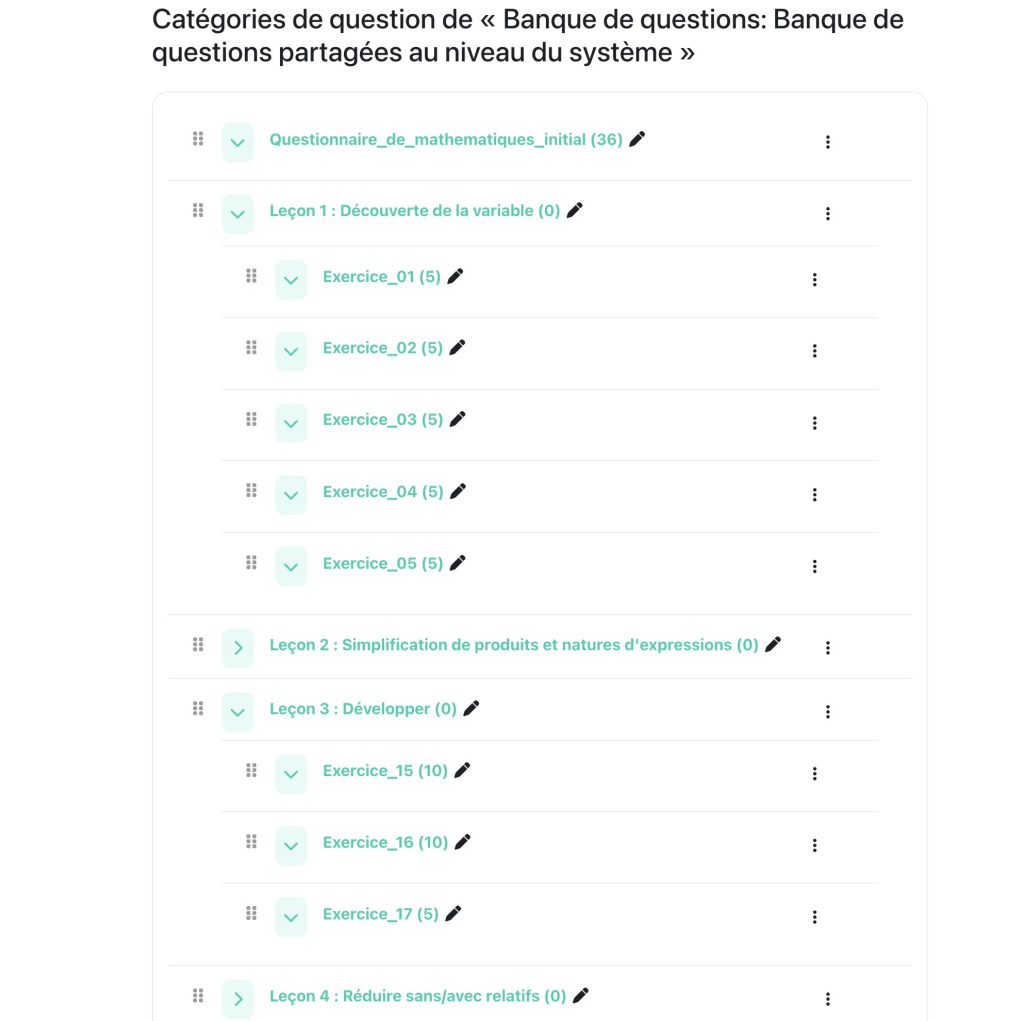
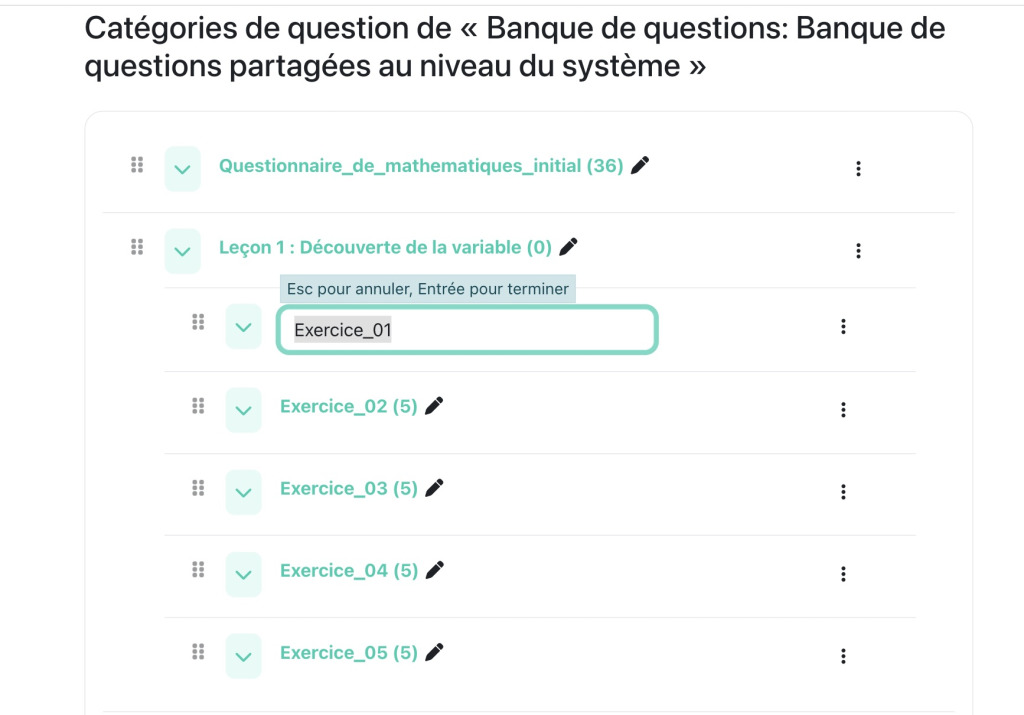
- Rename a category directly in the list: click, modify and save. No more trips back and forth to the parameters page for a simple name change.
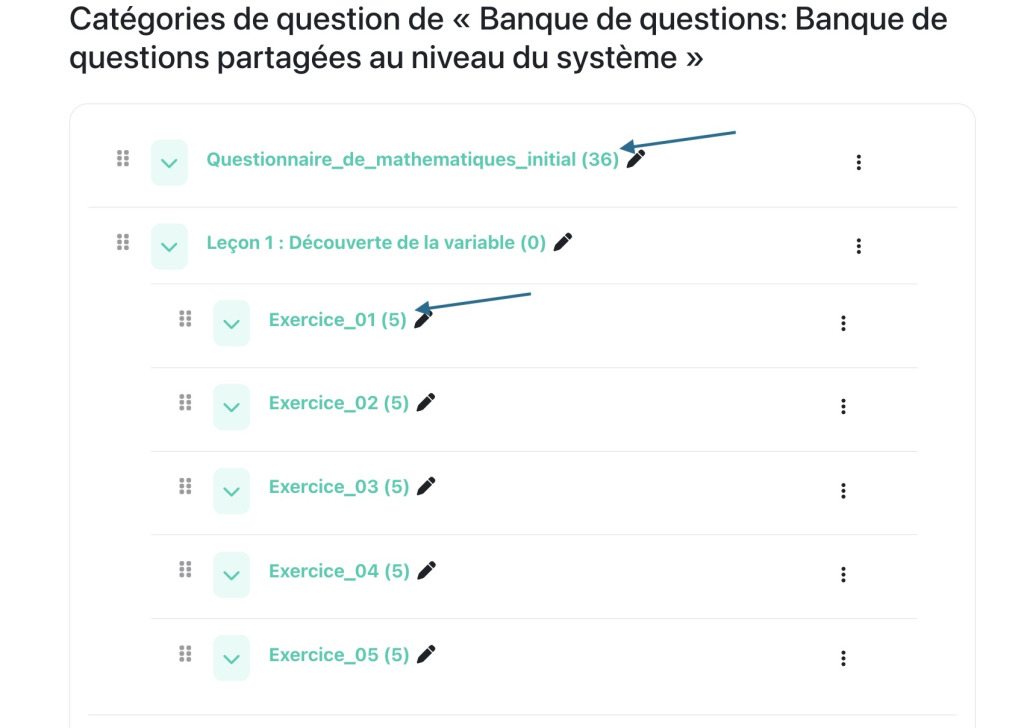
- The number of questions is displayed for each category, so you know what you have without having to open each category one by one.
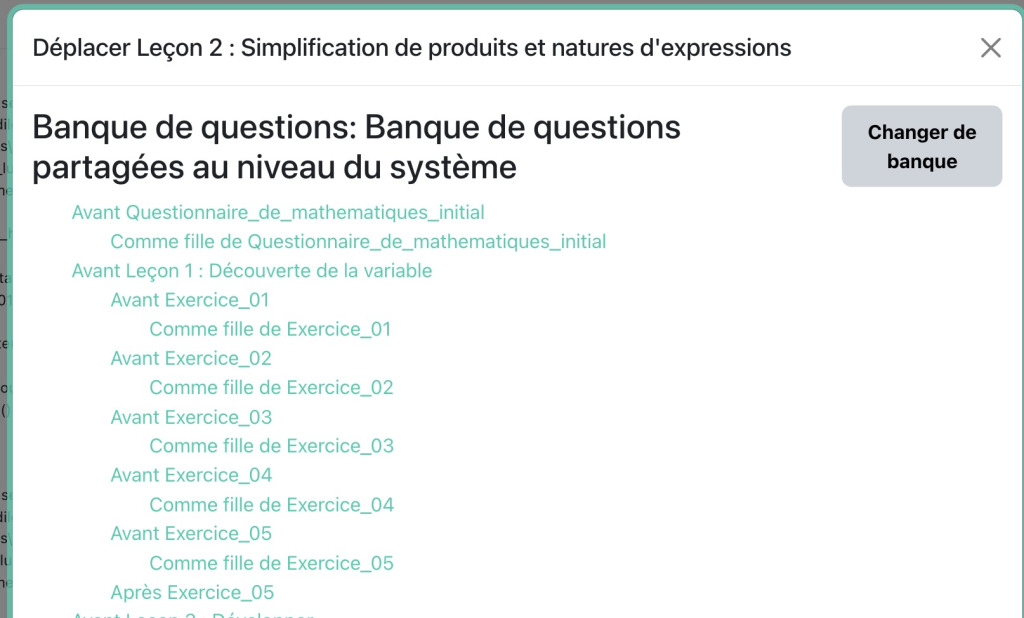
- Move an entire category to another question bank, including sub-categories and questions. Handy for restructuring your banks between courses or contexts.
- Rename a question directly in the list, without opening its edit page – same logic as for categories.
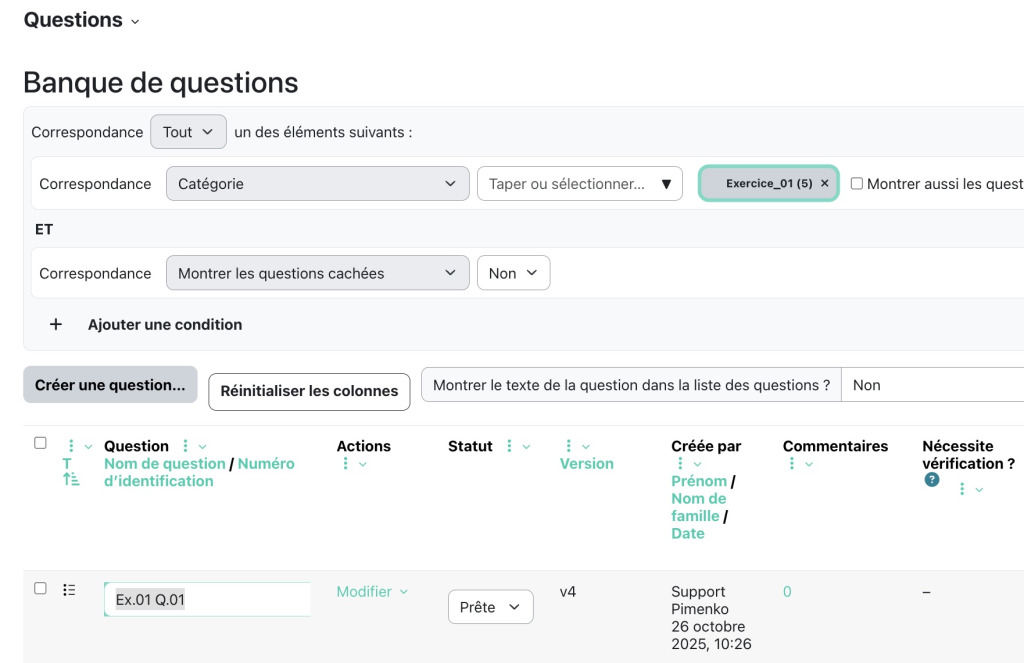
- The internal/tertiary navigation bar (the Questions / Categories / Import / Export tabs) finally adopts the same tertiary menu level as on equivalent Moodle pages. A small detail, but one that counts when you’re working on it every day.
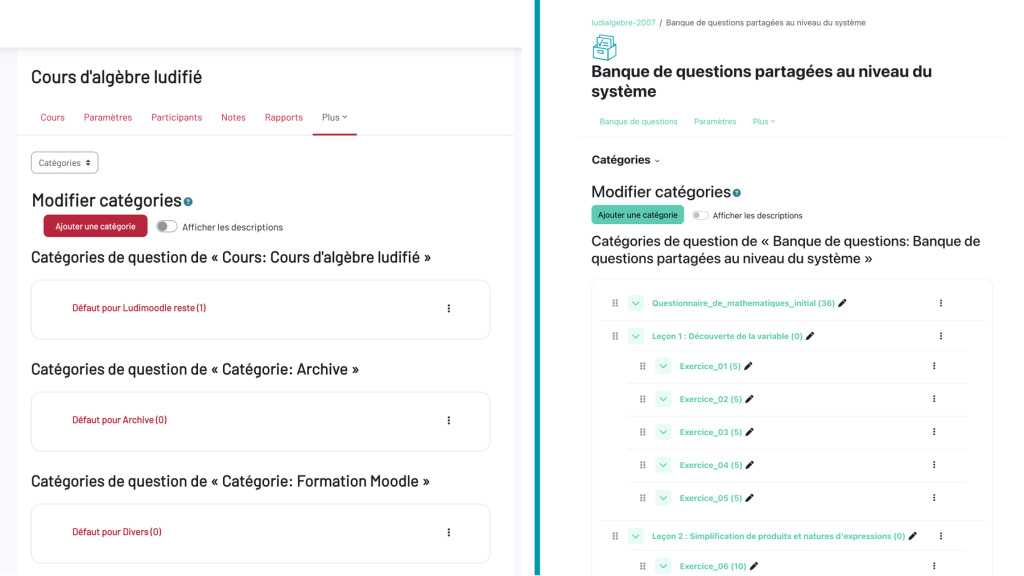
All these improvements converge towards the same goal: to make the question bank usable on a large scale. Nothing spectacular individually, but the cumulative effect is real for anyone managing complex valuations on a daily basis.
Sub-sections: reducing unnecessary clicks
The sub-sections that appeared in Moodle 4.5 no longer have their own dedicated page. This information is important, as all course format developers (including Pimenko with Ludilearn or Softcourse) must take the necessary steps to adapt their plug-ins.
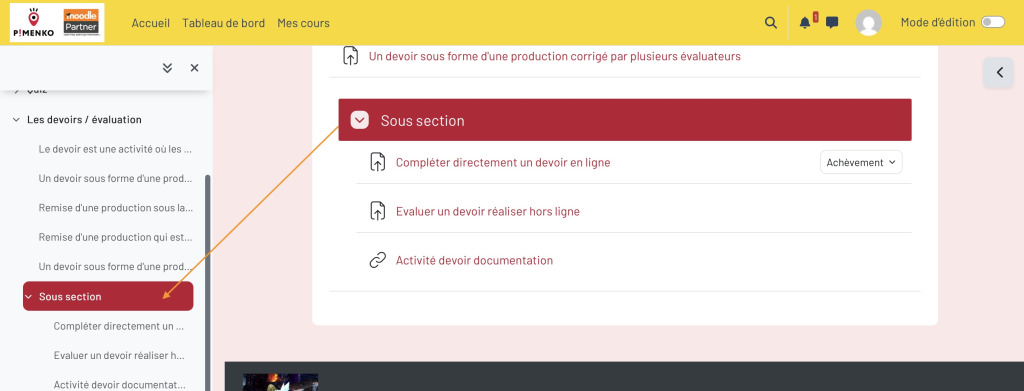
On the user side, clicking on a sub-section from the course summary takes the user directly to the anchor in the course page, without reloading.
Please note: the “Description” field in the sub-section parameters has been removed.
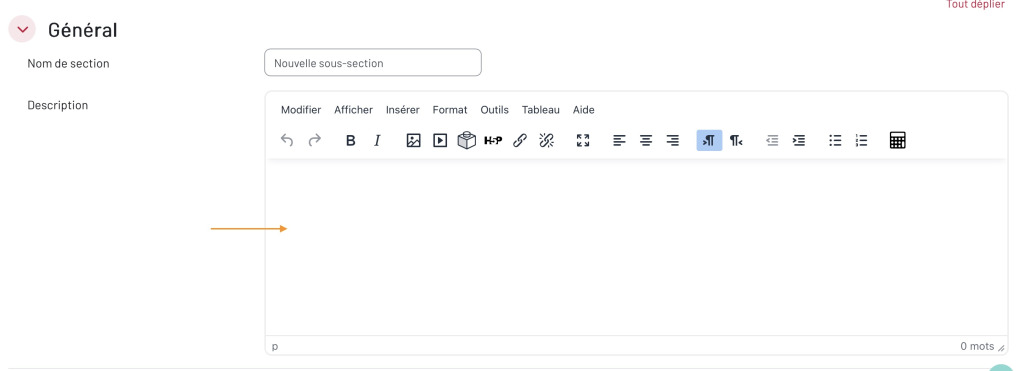
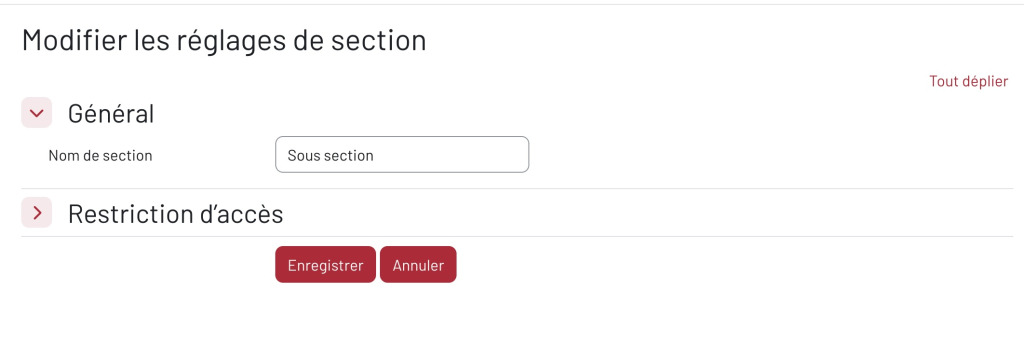
How does this migration work with the update? Existing descriptions are automatically converted into Text & Media activities when updated. Content is preserved, but check the layout of your relevant courses before and after.
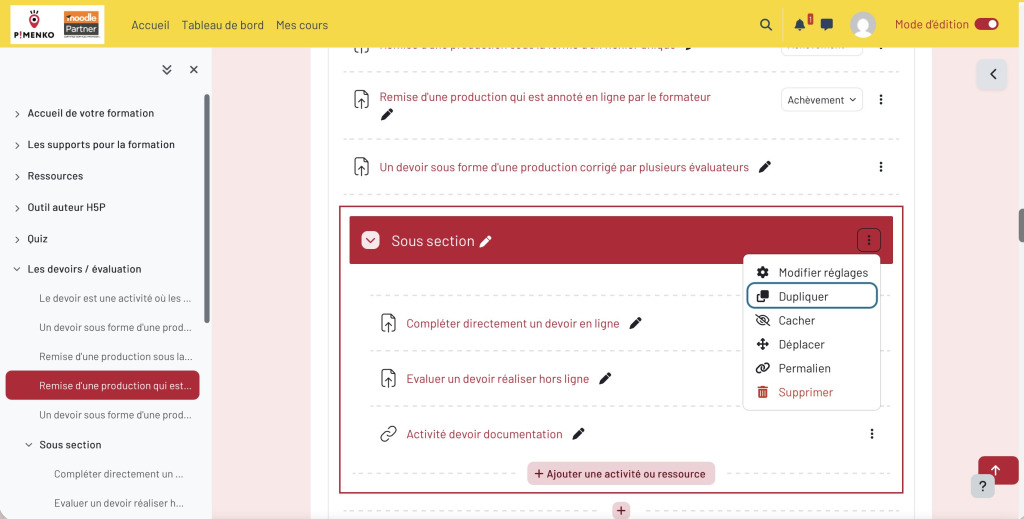
Duplicate a sub-section
Duplicate” option added to action menu
Live question-and-answer (Q&A) forums and flexible locking
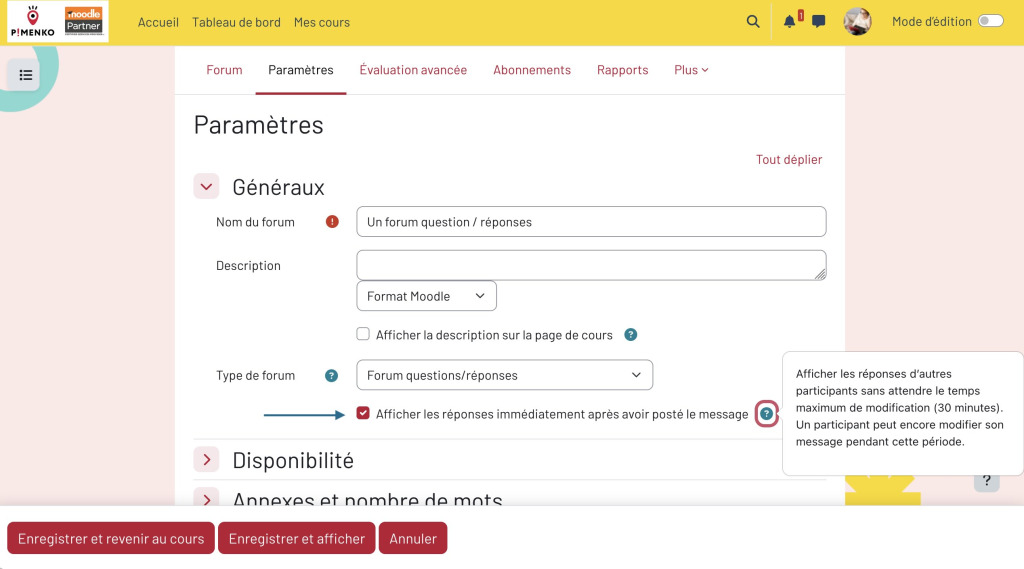
Q&A forum usable in real time: in Q&A mode, answers were hidden during the modification delay (up to 30 minutes). It can now be configured to display answers immediately, making the Q&A forum usable for live exchanges.
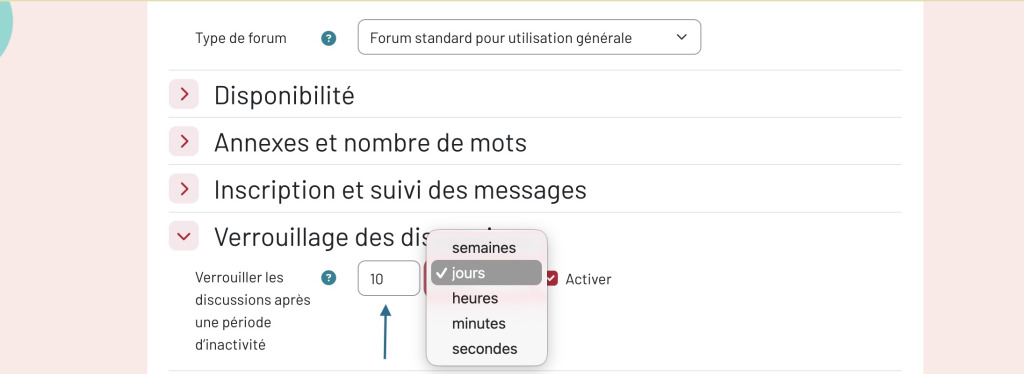
Automatic discussion locking: options range from short durations (2 days, 3 days) to long durations (2 years, 3 years, 5 years) for archiving or compliance purposes.
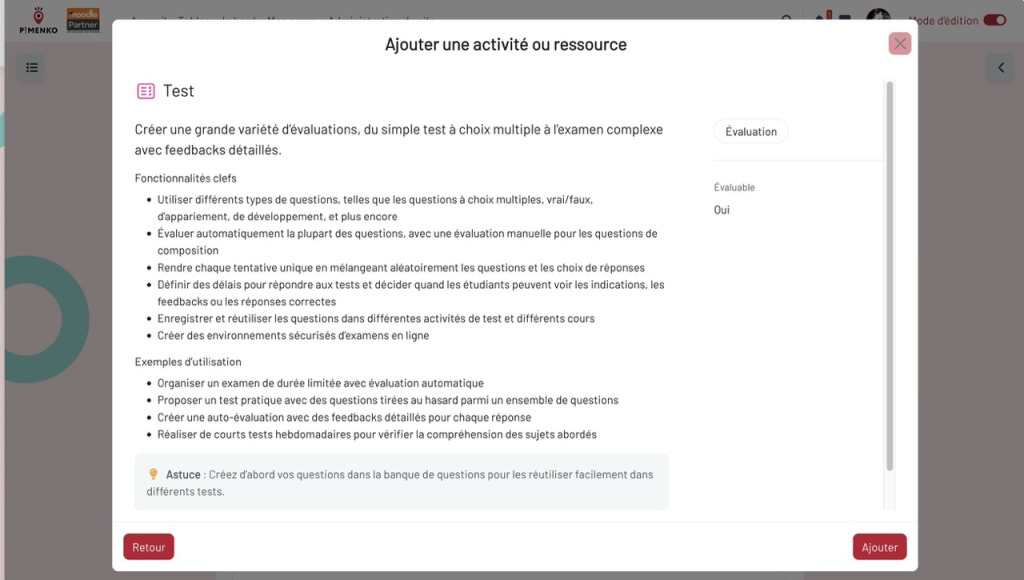
Better presentation of descriptions in the activity selector
The activity descriptions in the selector have been revised to make them clearer when choosing an activity to add to a course: description, help and tips are clearly identifiable.
In short, for teachers: Moodle 5.2 doesn’t reinvent digital pedagogy, but it does tackle some real-life irritants. Multi-correction, the question bank and the real-time Q&A forum are the three features to be tested as soon as the update is released.
What Moodle 5.2 changes in the interface and UX for everyone
In addition to its pedagogical features, Moodle 5.2 also includes a new project called“Course linear navigation” in the official release notes. The idea behind the name: to make navigation in a course more linear and predictable, so that learners move forward without getting lost in secondary pages, without looking for completion/progression buttons, without coming across a padlock without explanation. Twenty or so tickets contribute to this same objective, each focusing on a specific point of the interface.
In the price index
The course title is now displayed in a fixed (sticky) header in the course index when scrolling. It’s also a link that takes you directly to the main course page.
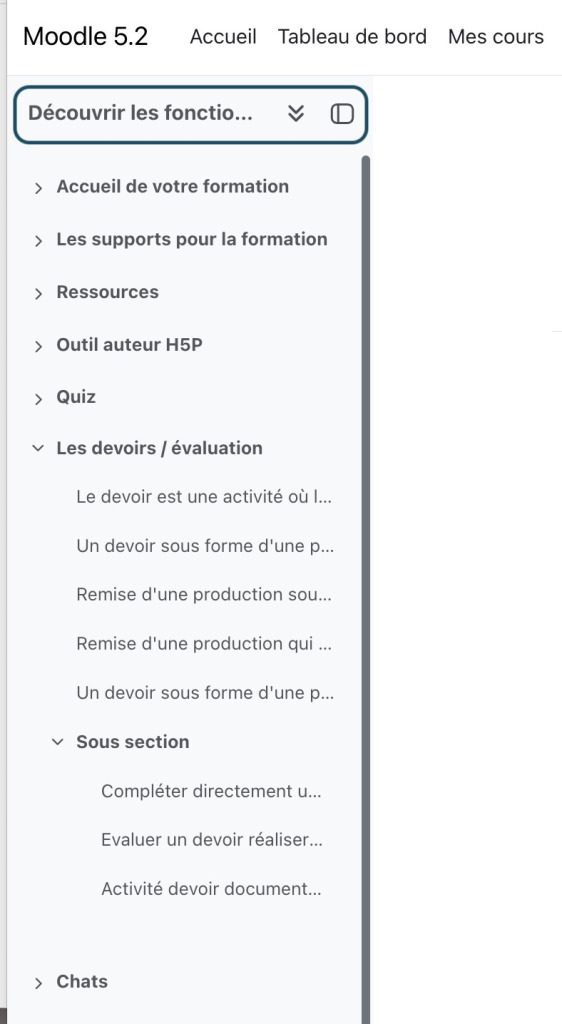
Course activities and resources
Opening and closing dates, if set in an activity, are displayed below the activity title (rather than at the bottom as before).
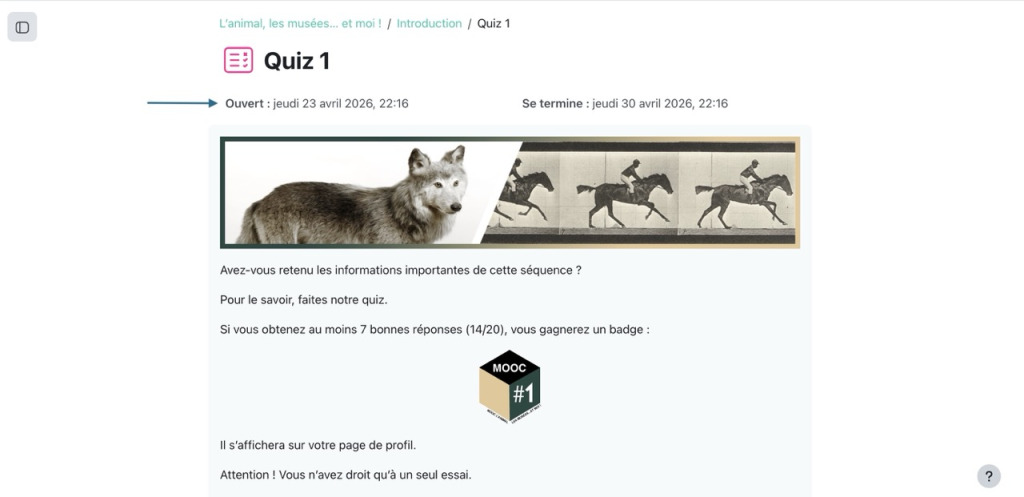
If automatic completion criteria are used, they are displayed directly below the description in a revised design.
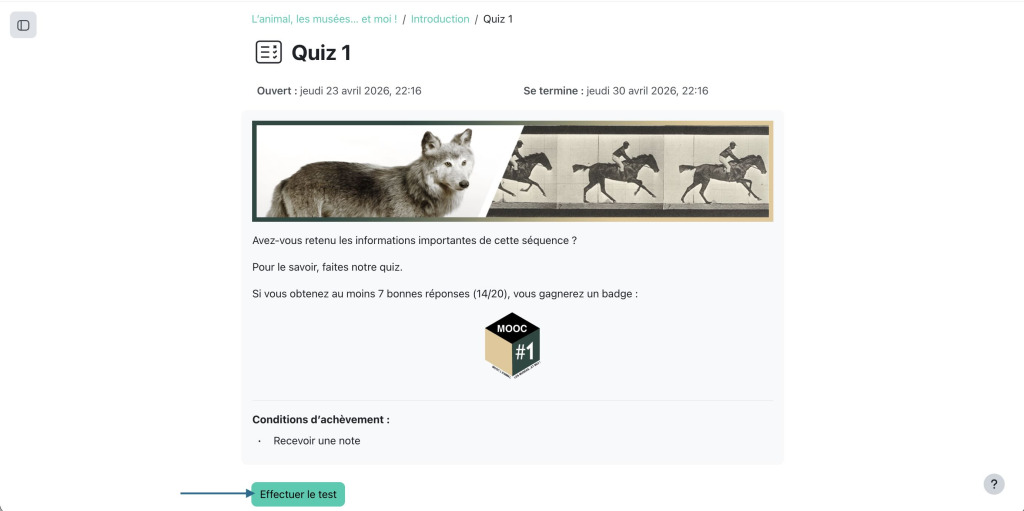
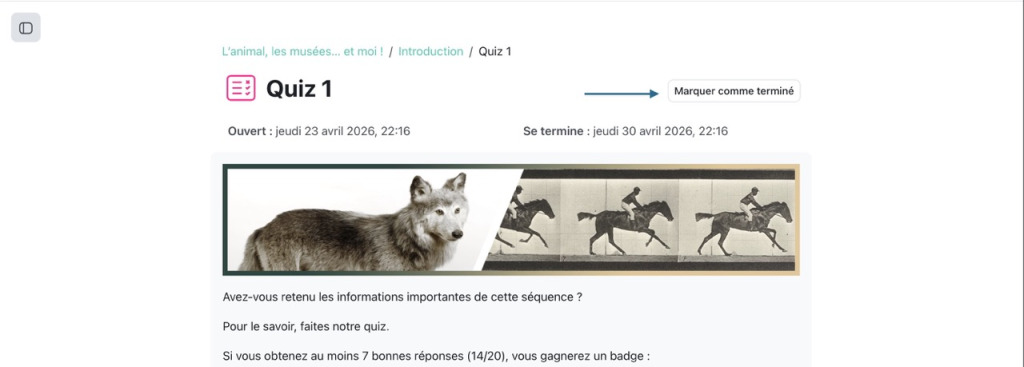
In the case of automatic completion, the “Mark as complete” button is in the header, aligned with the activity title and always visible, whatever the length of the content.
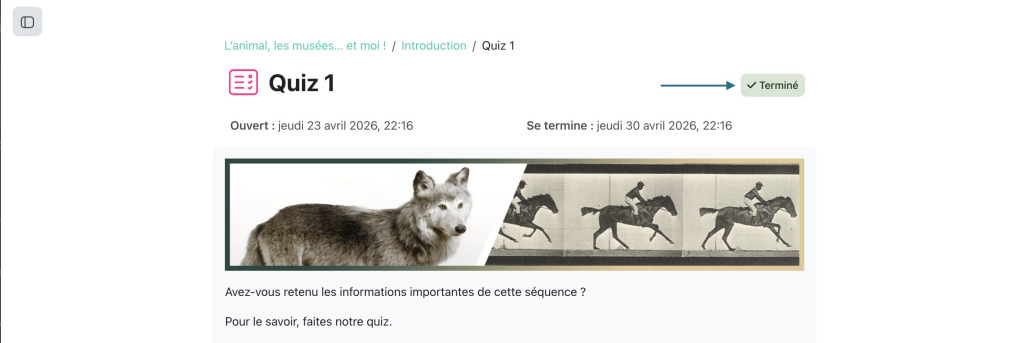
When automatic completion is reached, the text “Completed” appears in the same position at the top of the activity page.
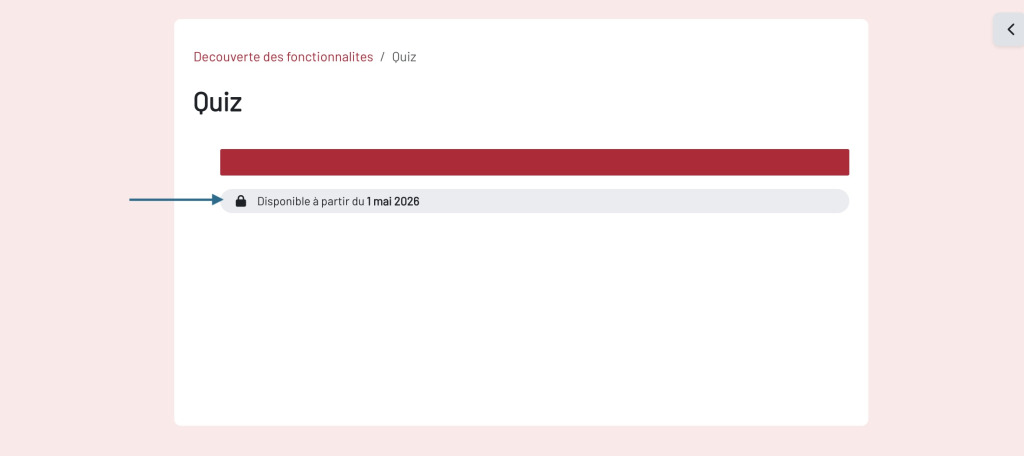
Resctrictions on activities or sections: when a learner tried to access a locked activity, a gray padlock appeared with no explanation. He now has clear information about why he can’t access the content, which will probably reduce support requests such as “I can’t access the course activity”.

Moving activities and sections is more visible
By temporarily highlighting the sub-section reached via an anchor link, users can quickly see where they have arrived in the main content area of the page.
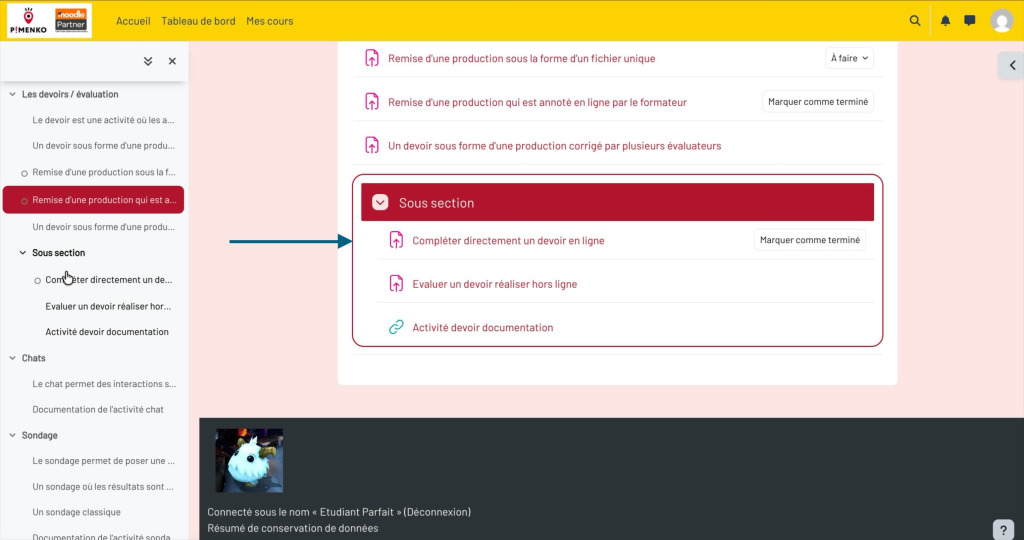
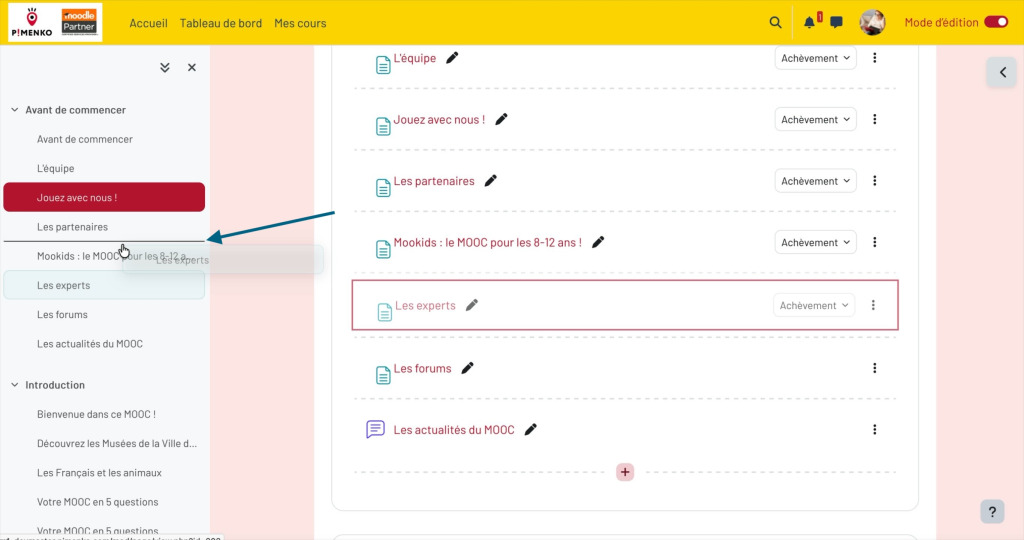
When dragging and dropping an activity or section, you can see exactly where the element will land: hover lines are visible to identify where elements are being moved.
New drawer opening and closing visuals
The icon for closing drawers (Course Index, drawer block) has been replaced by a new icon more consistent with the rest of the interface.

Old drawer icons are deprecated.
Footer action buttons are always visible in a fixed footer
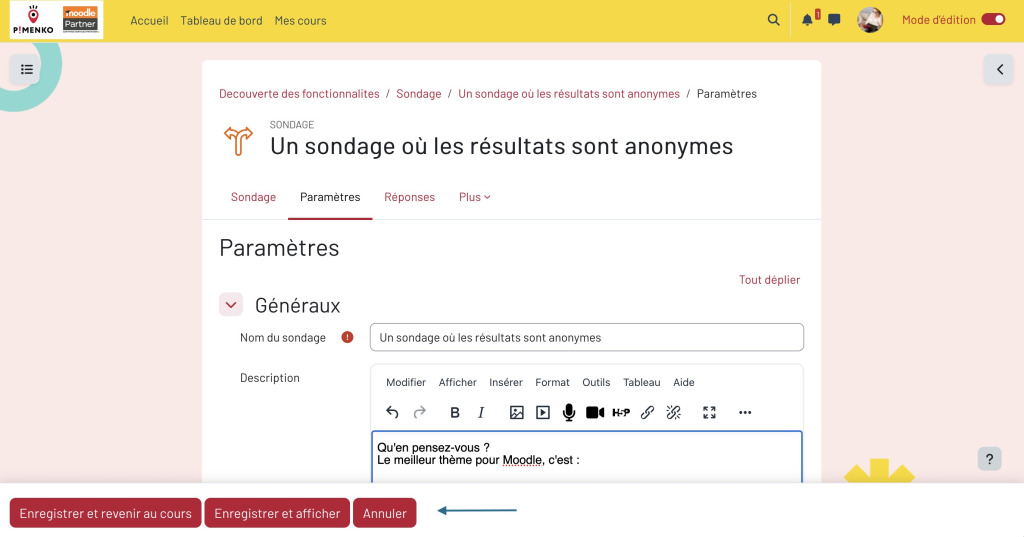
Action buttons such as “Save” and “Cancel” are now placed in a fixed footer that remains visible when scrolling. You’ll find this approach at various levels of your Moodle: course and activity editing forms, and on the user profile page.
Global interface: the little details that make all the difference
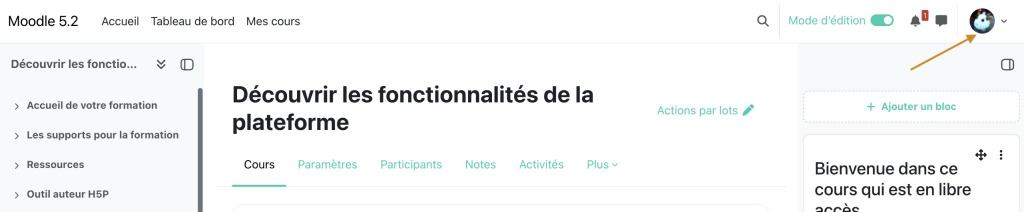
Theuser avatar is repositioned to the right in the navigation bar at the top of all pages.
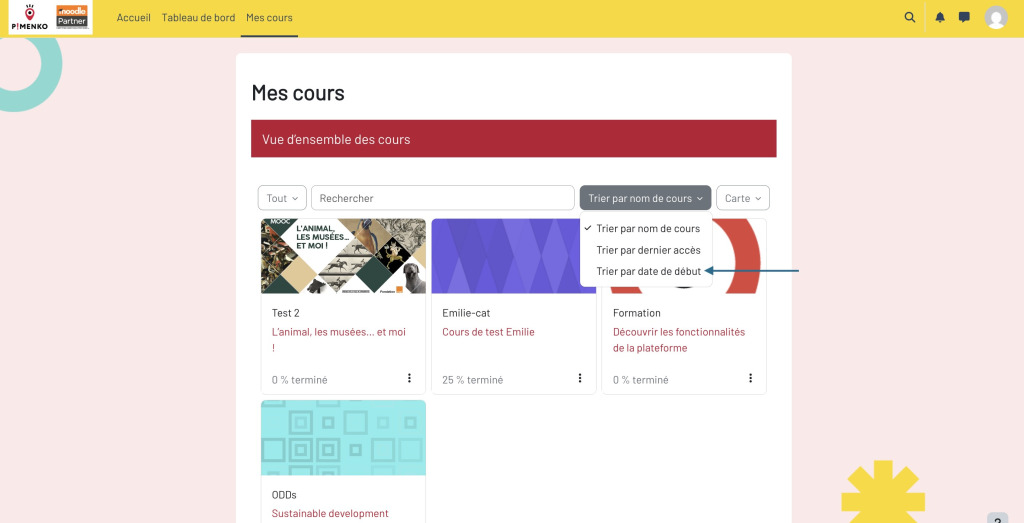
On the “My Courses” page, and in the block displaying the courses in which a user is registered, you can sort courses by “course start date”. This is particularly useful for quickly finding recent prices.
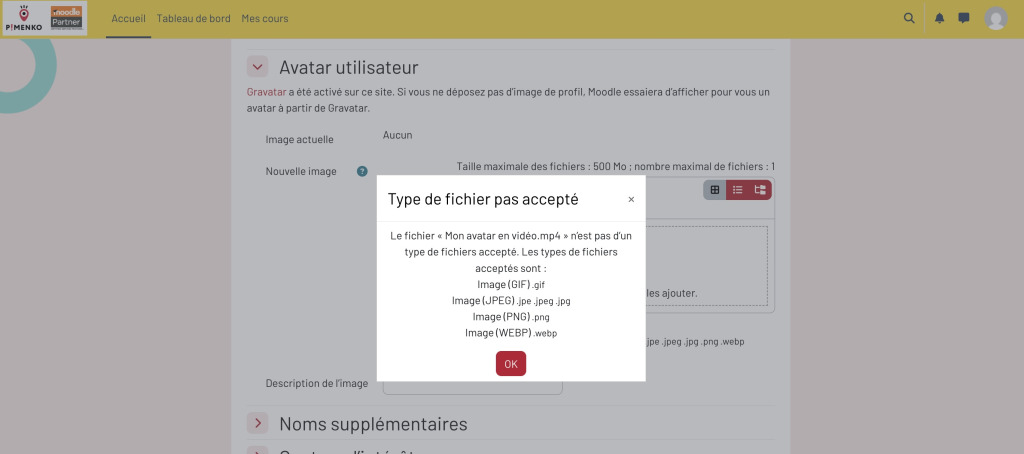
File upload error messages have been improved: if a user tries to upload a file whose type is not accepted, the message clearly explains why.
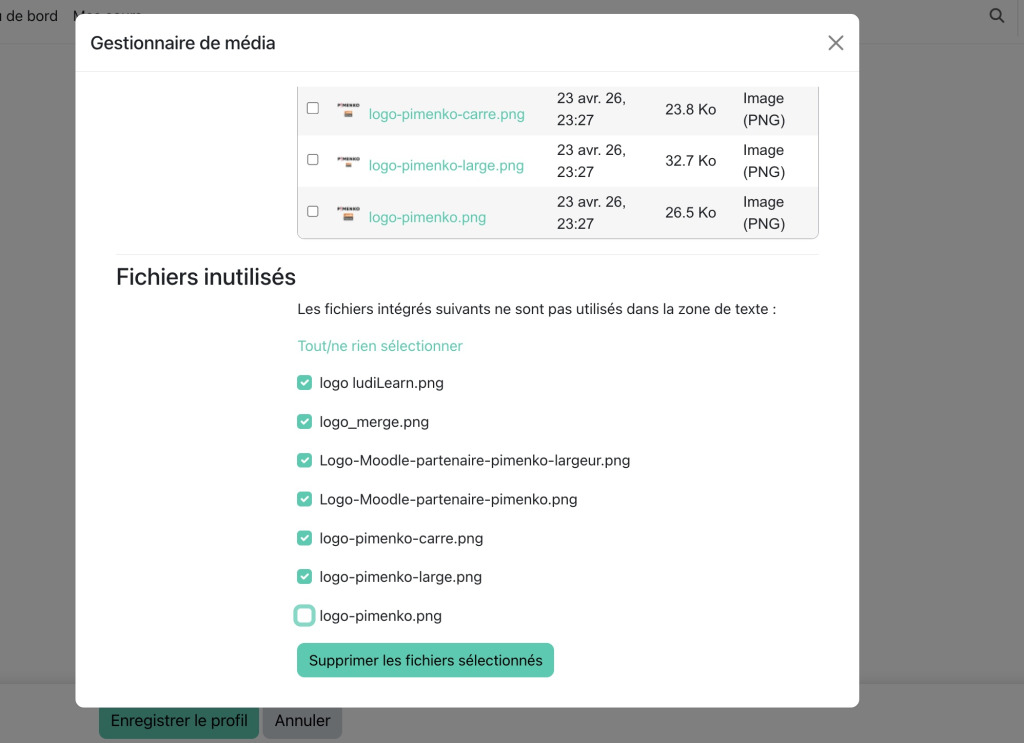
TinyMCE: Select or deselect all to manage unused files in the text editor. This makes management more practical.
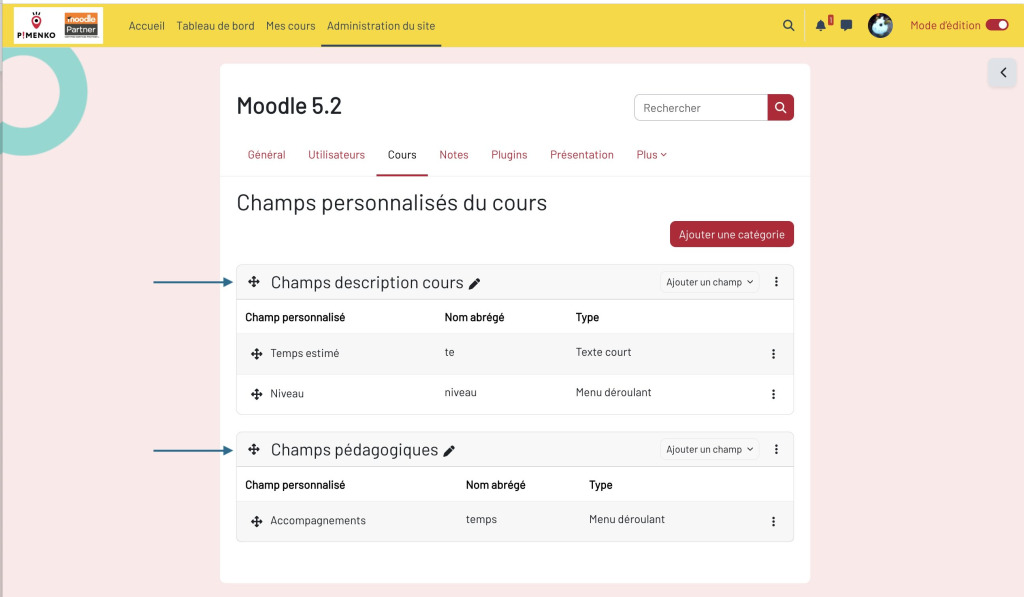
Custom fields management pages: the layout has been refined with better visual separation and a redesign to be consistent with the other pages on the site.
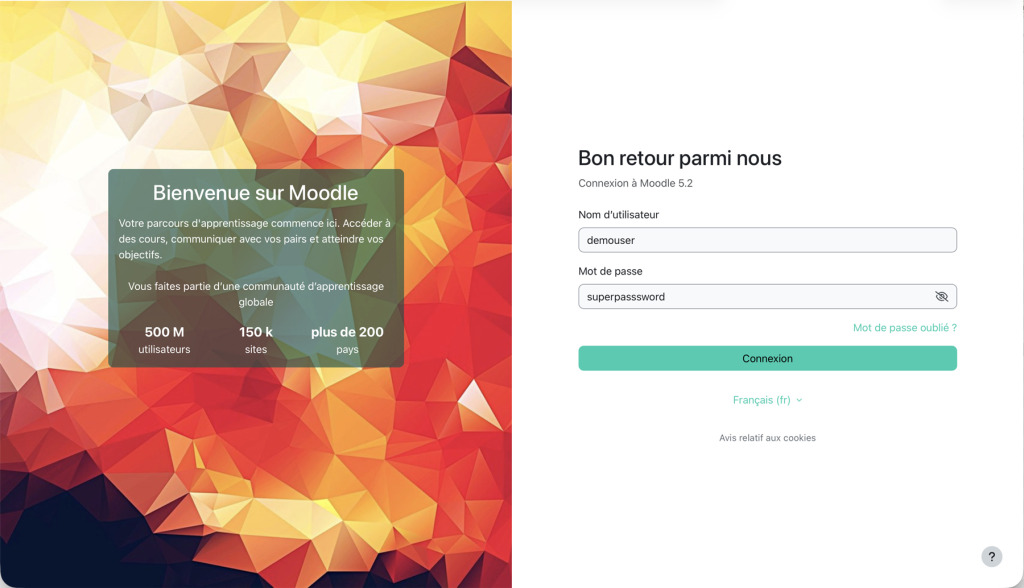
A redesigned authentication page
The default authentication page in the boost theme has been completely overhauled: the design is more modern, you’ll find a background image configurable by the administrator, a streamlined form and the option to see the password written down.
The experience for multi-factor authentication (MFA) follows the same design (e-mail, SMS, security key, authentication application).
On mobiles, password visibility is enabled by default: users can see what they are typing, which is practical on this format of device and less problematic for security, since consultation is generally more individual.
There’s also something new for new installations only. Default authentication settings change :
- Force login enabled
- E-mail connection enabled
- Guest access button hidden
If you update, your current settings remain unchanged.
Dashboard: courses in the foreground (new installations)
For new installations, the dashboard has been redesigned to highlight courses directly:
- The “Course overview” block is added to the dashboard by default, along with the “Create course” and “Manage” buttons for administrators.
- The Calendar block is moved to the block drawer
- The “Home” and “My courses” pages are disabled by default to reduce confusion.
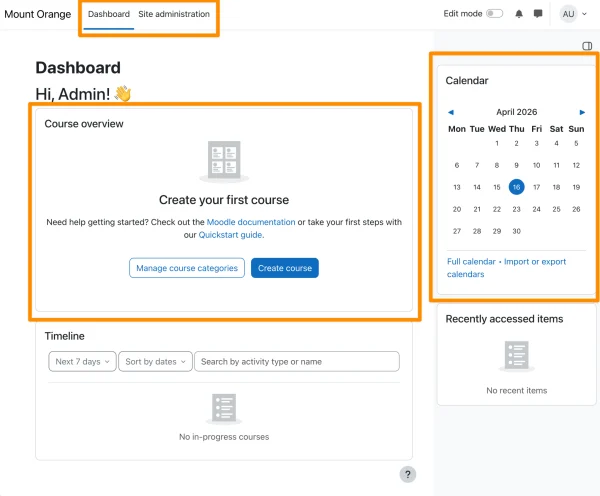
This applies to new installations only. If you update an existing site, nothing changes.
To sum up the UX: the list of changes is long, but the result is coherent. Moodle 5.2 makes the interface more predictable: important elements are right where you expect them, restrictions are explained and confirmations are visible.
It’s an in-depth project that doesn’t make a lot of noise, but it’s very important for modernizing Moodle.
What Moodle 5.2 changes for administrators
There’s two pieces of good news for administrators in this version: AI is expanded with two new native providers, and the Report Builder offers fine-tuned searches. The rest is a series of small, time-saving improvements.
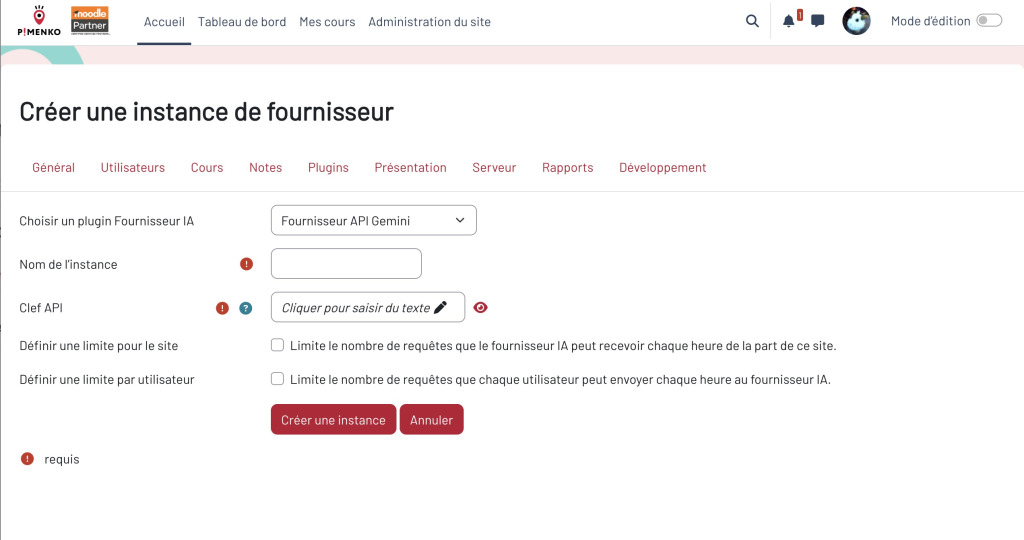
Two new AI providers in the heartland: Gemini and AWS Bedrock
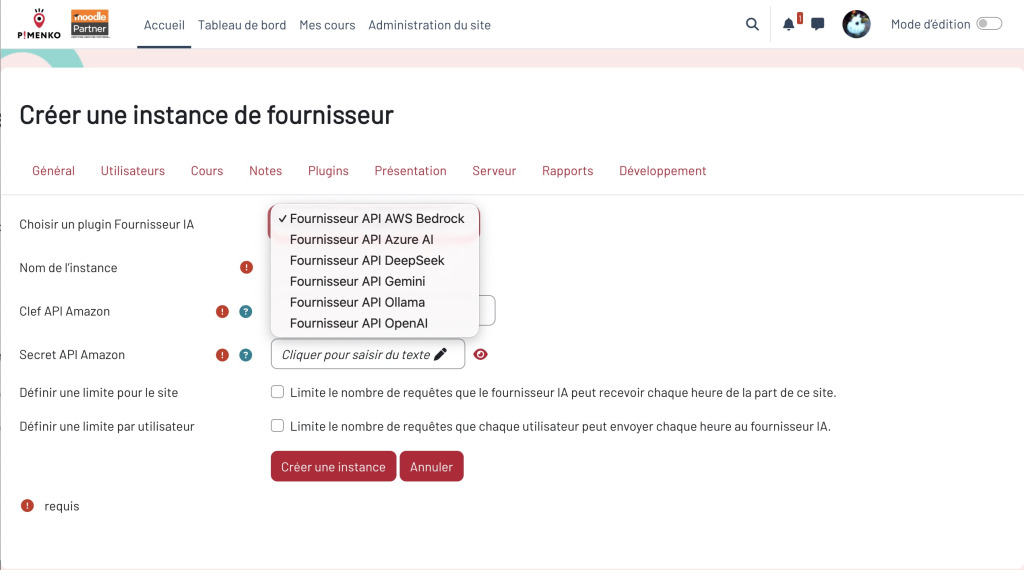
Until now, Moodle’s core already supported providers such as OpenAI and Azure OpenAI. Moodle 5.2 adds two new providers directly to the core, so you don’t need to install any additional plug-ins if you use them.
Google Gemini: the community plugin is natively integrated. You’ll find it in Admin > IA > Providers with the same interface as the others.
Amazon Bedrock: for institutions already in the AWS ecosystem, the provider is also offered in the Moodle/ core.
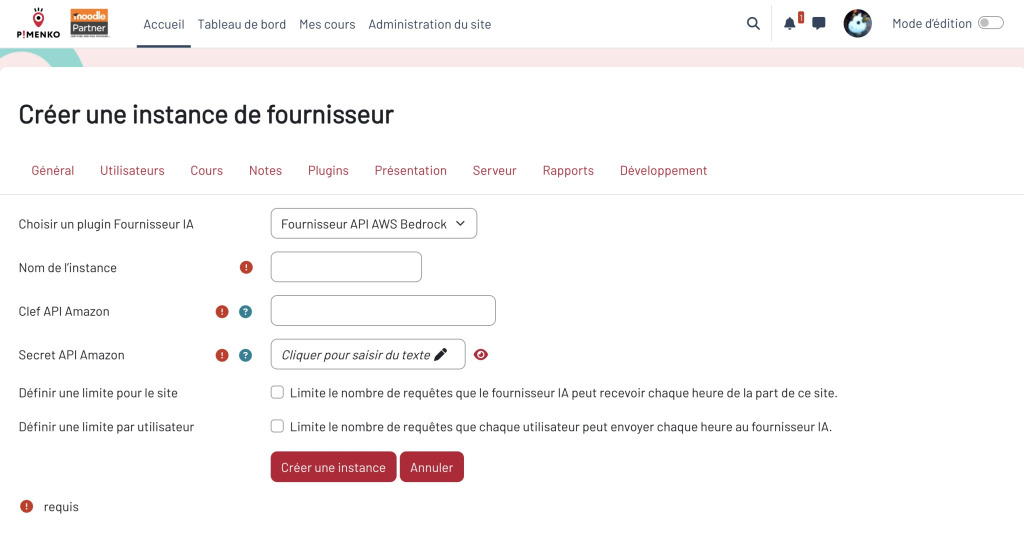
As a reminder, all providers available by default in Moodle administration have options for defining usage limits.
Report Builder: ever more powerful filters
Wildcards in filters: use * and ? in user list filters – dupont* returns all Duponts(MDL-84082)
Database read/write filters in job logs: filter by number of operations to identify the most database-intensive jobs(MDL-86396)
Toast notifications: visual confirmation of scheduled report activation/deactivation(MDL-86385)
Course module reports: standardized behavior for all module-related custom reports(MDL-86699)
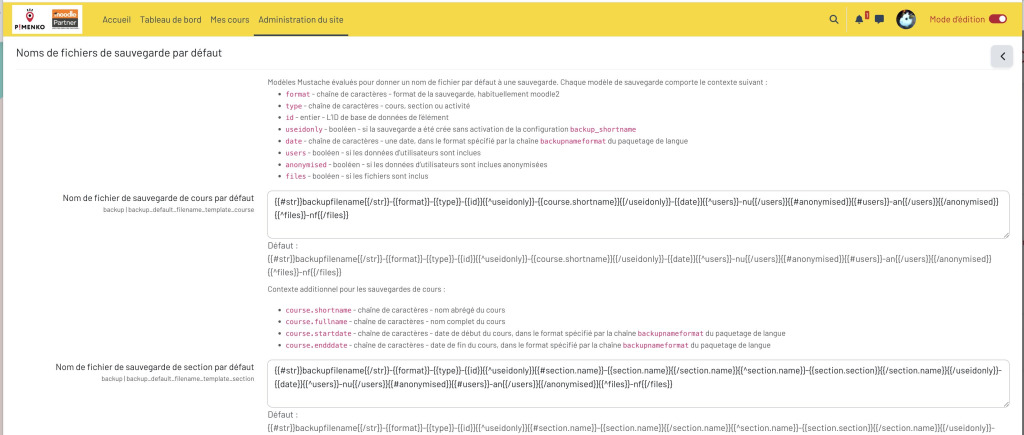
Configurable name for course backup files
Course backup file names can now be configured via Mustache templates. You can therefore opt for schemes aligned with your internal policies to improve traceability between systems and facilitate, for example, archiving or preparation for a new training year.
Course deletion via CLI by short name or identifier
The CLI command to delete a course now supports the short name and ID number of the course, not just the internal ID. For example, you can use :
php admin/cli/delete_course.php –non-interactive –shortname=moncoursamoi
This is useful for mass administration scripts linked to student information systems.
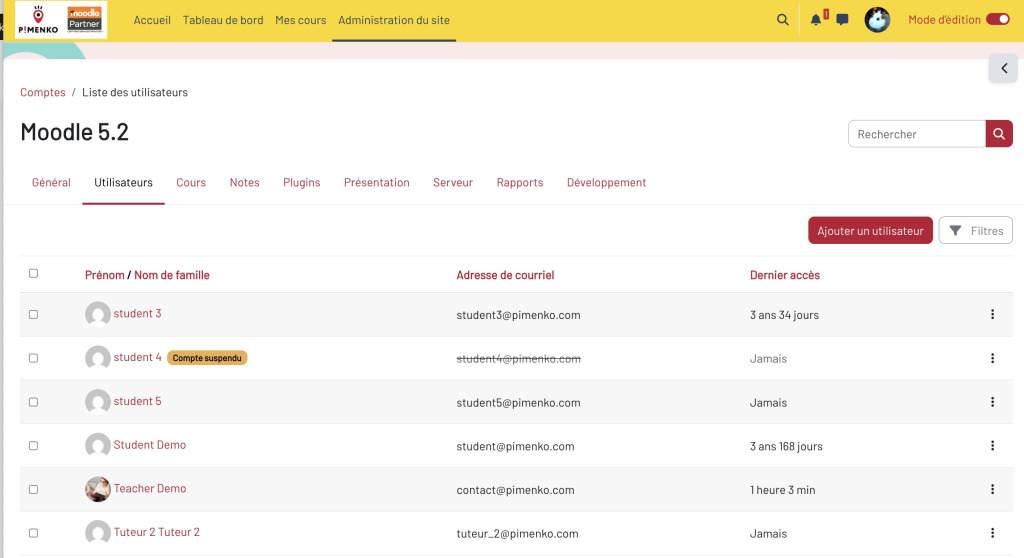
Suspended” status more visible in user list.
A student’s suspended status is now displayed more clearly on the profile page and on the user management page. This reduces confusion during access diagnostics.
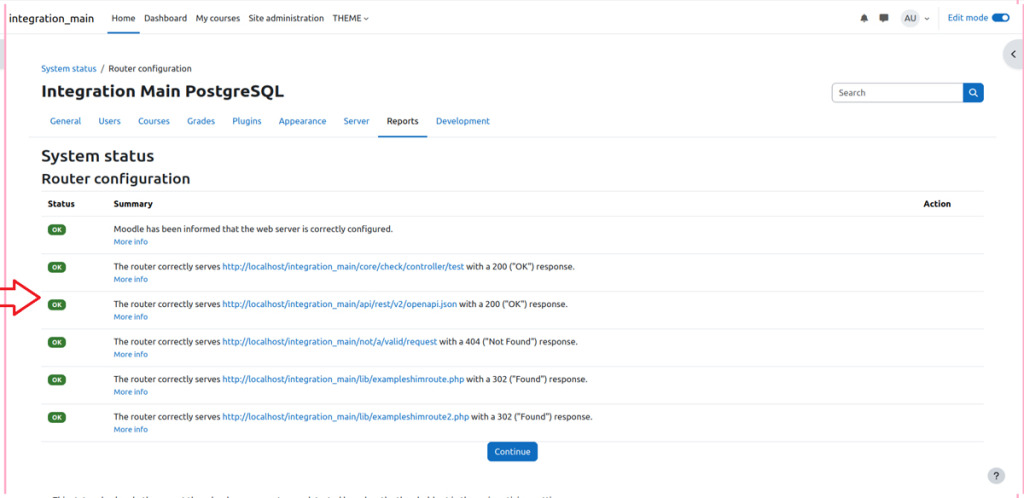
Routing configuration check
An environment check is added to ensure that routing is correctly configured on the server. Moodle 5.1 introduced routing and Moodle 5.2 adds this check to avoid silently incorrect configurations.
Redis
If you like Moodle platforms that respond quickly and therefore use a cache server with Redis, be aware that a small modification is proposed: separating the connection timeout with two separate parameters in config.php – session_redis_connection_timeout and session_redis_read_timeout.
This solves cache purge failures during updates on large Moodle systems.
To sum up for administrators: no fundamental changes requiring specific training or communication to users. On the other hand, there are two points to watch out for before upgrading: PHP 8.3 is now mandatory, and courses with described subsections must be audited before migration.
What Moodle 5.2 changes for plugin developers
This is the part of the release that most excites our plug-in development team at Pimenko, not because Moodle 5.2 delivers spectacular dev-side features, but because we’re finally seeing the foundations of the architectural transformation take shape.
The MoodleHQ three-year plan you need to know about
To understand what Moodle 5.2 delivers, we need to place the version in the roadmap that MoodleHQ has been following since the end of 2025:
- 2025: the aim was to lay the foundations, finalize the architectural choices and prepare the tools.
- 2026: adopt React as the new UI framework, integrate Composer into the core, implement observability
- 2027: extend web services and new UI, container orchestration, static code analysis
The ultimate goal is to have an architecture where the interface can evolve independently of the backend, where plugins can be deployed more easily and where the platform is observable from end to end.
Moodle 5.2 is the first concrete milestone for 2026: React and Composer enter the core, Open Telemetry becomes available. It’s not yet a complete transformation, but it’s the first time that the foundations have become truly usable.
For each evolution, we indicate the corresponding Jira ticket. This is the most direct way to find the complete technical discussion, specifications and associated commits.
React in the heart: a foundation, not yet a finished product
MoodleHQ explicitly states this in the information sessions we follow: Moodle 5.2 is a “foundational release” for React. The aim is not to deliver everything at once, but to validate the approach in real-life conditions, identify gaps in the theme and overrides, for example, and refine the patterns. The official recommendation for developers is:“Start with small, isolated components, as the APIs will evolve further”.
In concrete terms, here’s what’s in place:
- React is available as a platform dependency(MDL-87908): the library is stored outside the public folder and served via the routing system. Each plugin simply does
import React from 'react'with a single instance for the whole site, without each plugin embedding its own copy. - A build system based on Esbuild(MDL-87759): React source files for a plugin go into
[plugin]/js/react/src/and are automatically compiled into[plugin]/js/react/build/. Esbuild scans the Moodle tree to find alljs/react/folders, without any manual plugin configuration. - Import Maps for module resolution(MDL-87922):
page_requirements_managergenerates an Import Map that maps standard names (react,@moodlehq/design-system,@moodle/lms/[plugin]/) to Moodle’s internal paths. Result: each dependency is defined only once, paths are predictable and the risk of conflict between plugins is reduced. - A Mustache helper
{{#react}}(MDL-87765): the most tangible part for PHP developers. It allows you to instantiate a React component directly in an existing Mustache template. A JavaScript Observer detects tags, automatically assembles the component and cleanly disassembles it when it leaves the DOM, with no initialization script to write. - Profiling of React components(MDL-87987): a profiling capability has been added to diagnose component performance in the Moodle context.
Moodle Design System: design tokens make their debut
The NPM package @moodlehq/design-system v2.1.0 is integrated on two levels:
- On the CSS side(MDL-87730): design tokens (colors, spacing, typography) are integrated into the Boost theme at
/public/theme/boost/scss/design-system/, gradually replacing existing CSS variables. Verifiable in Admin > Development > Third-party libraries. - On the JavaScript side(MDL-87909): the same package is served as a JS bundle via Moodle routing, so that React components can import Design System elements directly.
Composer: available in the core and mandatory from Moodle 6.0 onwards
Composer was already being used in Moodle development, but it wasn’t integrated into the core. It’s done with Moodle 5.2 and it’s very structuring, especially since its introduction also unlocked Open Telemetry, which depended on it.
What’s available now :
- Third-party PHP libraries can be installed without modification via Composer, in parallel with the current approach(MDL-87950).
- Test dependencies are grouped together at
moodle/moodle-testingon Packagist. No need to list them one by one(MDL-87713)
Composer will be mandatory in Moodle 6.0. Now is the time to integrate it into your development processes to avoid being under pressure in 12 months’ time.
Open Telemetry: observability makes its debut
Open Telemetry is an open standard for instrumenting an application and collecting observability data: traces, metrics, logs. It is compatible with popular tools such as Jaeger, Zipkin and Grafana Tempo.
Its integration into Moodle 5.2(MDL-87045) is available via the Composer package moodlehq/moodle-package-otel, configurable via php.ini. Today, it instruments pages, cron, events, the external API and logs.
This feature is particularly useful for hosts and large installations who want to understand what’s really happening on their Moodle.
Other changes for developers
Write connection to specific tables(MDL-87703): ability to mark tables as requiring write connection rather than read replication. This is useful for MySQL/PostgreSQL installations with replication that experience lag problems on certain critical operations.
Themes: include original template when overriding(MDL-77894): a child theme can now include the original template instead of duplicating it in its entirety. Less maintenance, less risk of discrepancies with each update.
Impairments to note for your plugins
- Unused drawer icons deprecated(MDL-88085)
core/modal_factoryandcore/modal_registry(MDL-79182)- Removal of deprecated methods from Moodle 2.x, 3.x and 4.x ≤ 4.4(MDL-87427 to MDL-87425)
moodle-core-notificationandquestion-chooser: final depreciation(MDL-81962, MDL-81961)
In summary for developers: start structuring your projects with js/react/src/ and testing your Composer pipelines. Composer will be mandatory in Moodle 6.0. The right time to anticipate is now – not in 12 months’ time.
Verdict
Moodle 5.2 is a solid version, in every sense of the word.
From a pedagogical point of view, multi-correction meets a real need and is a Phase 1 that is set to expand. The question bank continues to professionalize. Q&A forums can now be used as live sessions.
On the UX side, Moodle continues to clean up its interface: coherent activity pages, readable restricted content, buttons that are always accessible, sensible font size.
On the technical side, React in the core and Composer change nothing today for users, but for plugin developers and DevOps teams, it’s a clear signal that the architecture is changing direction.
Do you have specific courses, custom plug-ins or a server infrastructure to upgrade? Pimenko can audit your platform and help you update Moodle.
ContactFAQ Moodle 5.2
When did Moodle 5.2 come out?
Moodle 5.2 was released on April 20, 2026. This is a standard support version (18 months).
What's new in Moodle 5.2 for teachers?
The main new feature for teachers is multi-correction of assignments, which allows several correctors to be assigned in parallel. The question bank has also been improved, and the Q&A forum can be used in real time.
Will Moodle 5.2 be in the next LTS release?
Yes, all Moodle 5.2 features will be included in Moodle 5.3, the next LTS (long term support) release due in October 2026.
What are the technical requirements for upgrading to Moodle 5.2?
Moodle 5.2 requires PHP 8.3 or higher and PostgreSQL 16 (or recent versions of MySQL/MariaDB). This is an evolution from Moodle 5.1, which still supported PHP 8.2.
Are existing plugins compatible with Moodle 5.2?
Most actively maintained plugins are compatible once the development teams have updated them. You can spot them with the early badge on Moodle.org.
The points to watch concern plugins that use the deprecated drawer icons, core/modal_factory, or core/modal_registry, now deprecated in Moodle 5.2. Changes to UX or course formats have an impact on plugins such as themes or course formats.
A compatibility audit is recommended before any migration to production. And for those still on the LTS: all these features will be in Moodle 5.3 (October 2026). Following 5.2 is already preparing for the next LTS.