
You are having a hard time knowing how much time your learners actually spend on your courses? LearningTime is just what you need.
Presentation #
LearningTime is a “reporting” type plugin that allows you to assign an estimated time to any activity of your choice within your course. As soon as a learner meets the completion criteria for an activity, this time is automatically recorded in their learning journey. This gives you an accurate and objective overview of the learning time within your class.
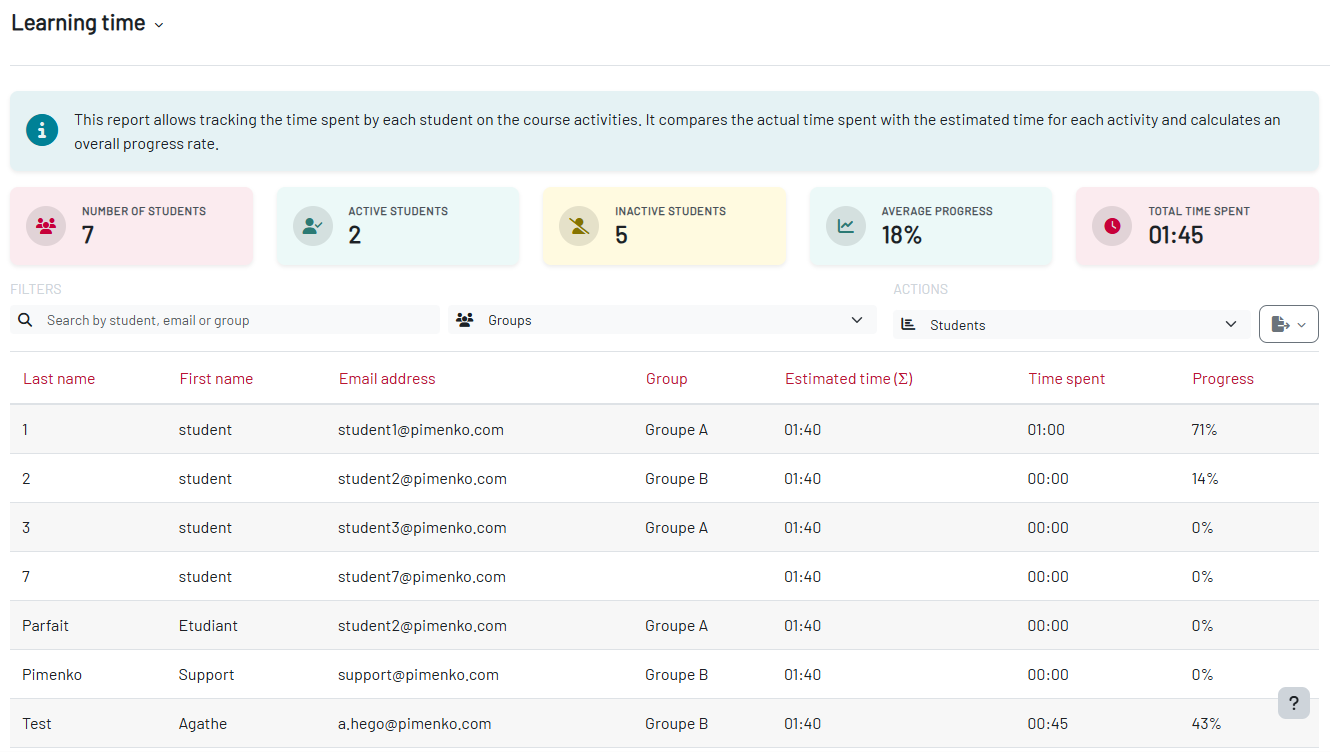
In short, with the ‘LearningTime’ plugin, you can:
- get an overview of information about course participants;
- view the list of activities included in the progress tracking and set the estimated time for each;
- access a comprehensive report showing the time spent by each learner on the course.
Information about the LearningTime plugin #
- Official name of the plugin :
- Developer: Pimenko, Sylvain Revenu
- Version: Moodle 4.5 et versions ultérieures.
What makes this plugin different from other existing Moodle plugins #
Moodle natively offers a feature to track time spent on activities, but this relies on an automatic measurement of connection time, which can be unreliable: a learner who leaves a page open without interacting with it will be counted as ‘active’.
LearningTime takes a different and more reliable approach: it is the completion of the activity that triggers the recording of time. In other words, it is not the time spent on screen that is measured, but whether or not an activity has actually been completed. It is therefore up to you to estimate how much time should be spent on each activity.
This approach offers several advantages:
- The data is consistent and not skewed by inactive sessions;
- The teacher or manager retains control over estimated times, adjusting them to suit the difficulty and scope of each activity;
- The report can be used directly to meet reporting requirements (accredited training courses, CPF, training reviews, etc.).
The overview of information about course participants #
Thanks to the different colour-coded sections at the very start of the report, you can see at a glance:
- the overall progress of participants;
- the number of active/inactive users;
- the total time spent by all registered users.

List of activities and estimated time spent by activities #
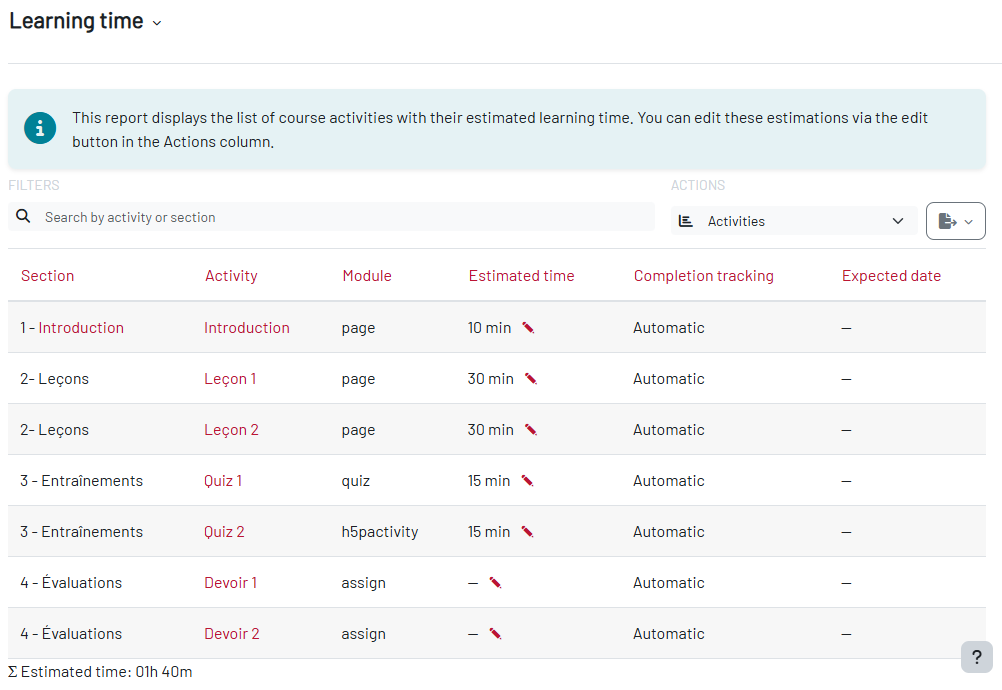
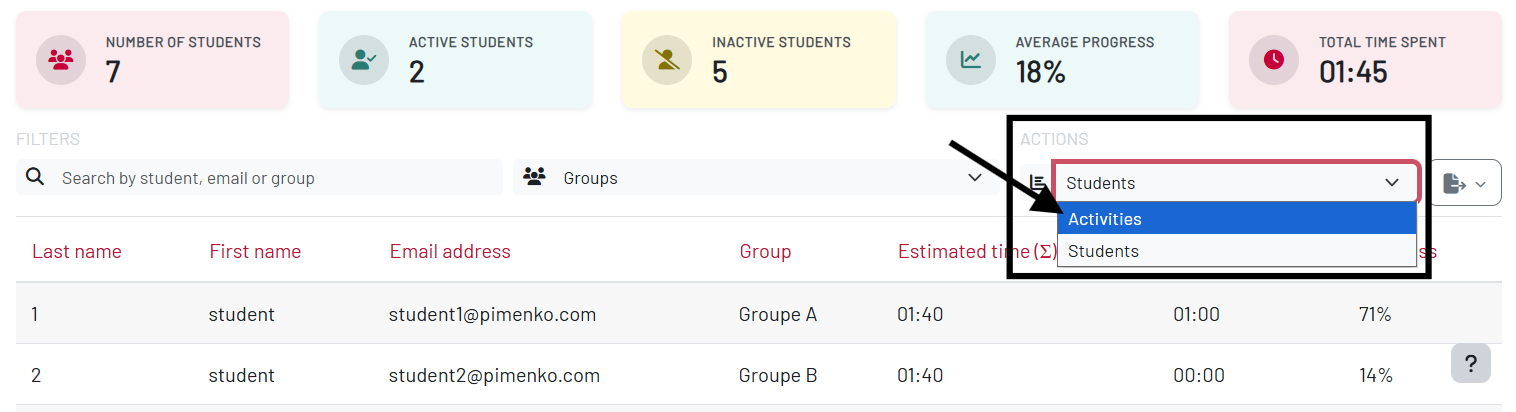
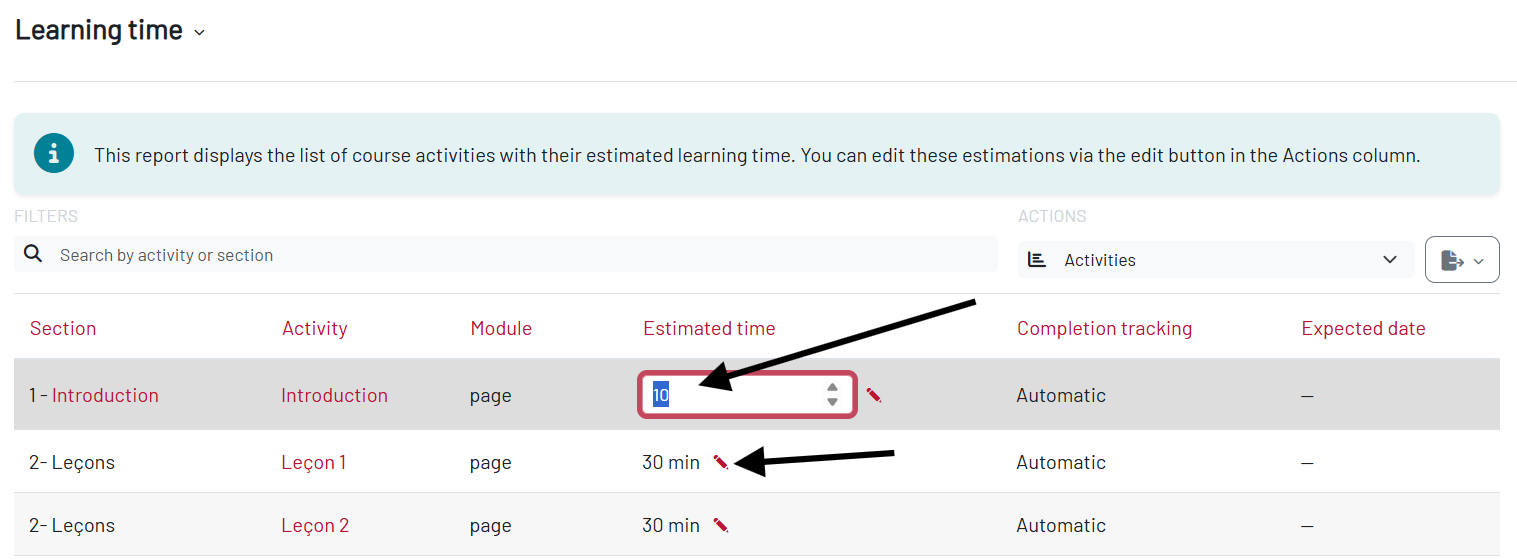
In the ‘Activities’ tab, you will find a list of activities for which completion requirements have been set up in the course (for more information, see our guides on this topic: Using Course Completion & How to Set Up Activity Completion). You can choose to assign a ‘time spent’ value for each one; this will be recorded for any learner who has met the completion criteria set for the activity.
‘Students’ tab: full report on time spent #
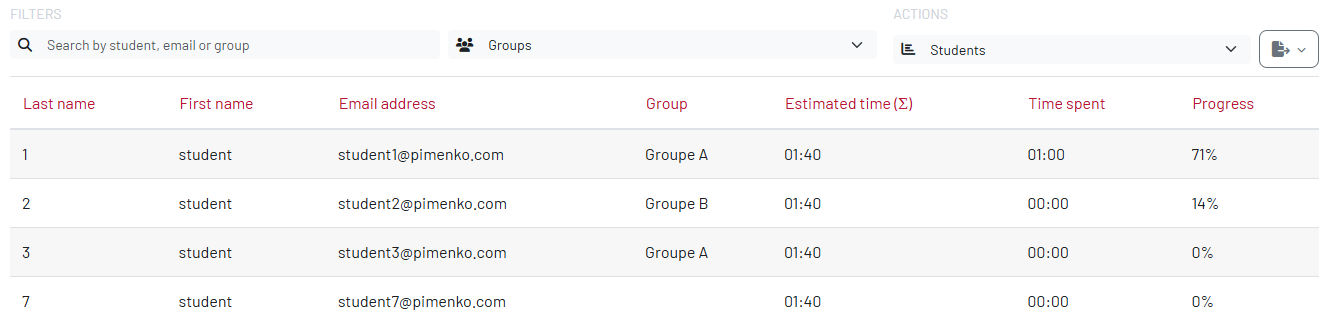
This report shows the following for each participant:
- their details (surname, first name, email address, group, etc.);
- their estimated time spent;
- their growth rate.
Step-by-step guide to viewing the report and tracking time spent on each activity #
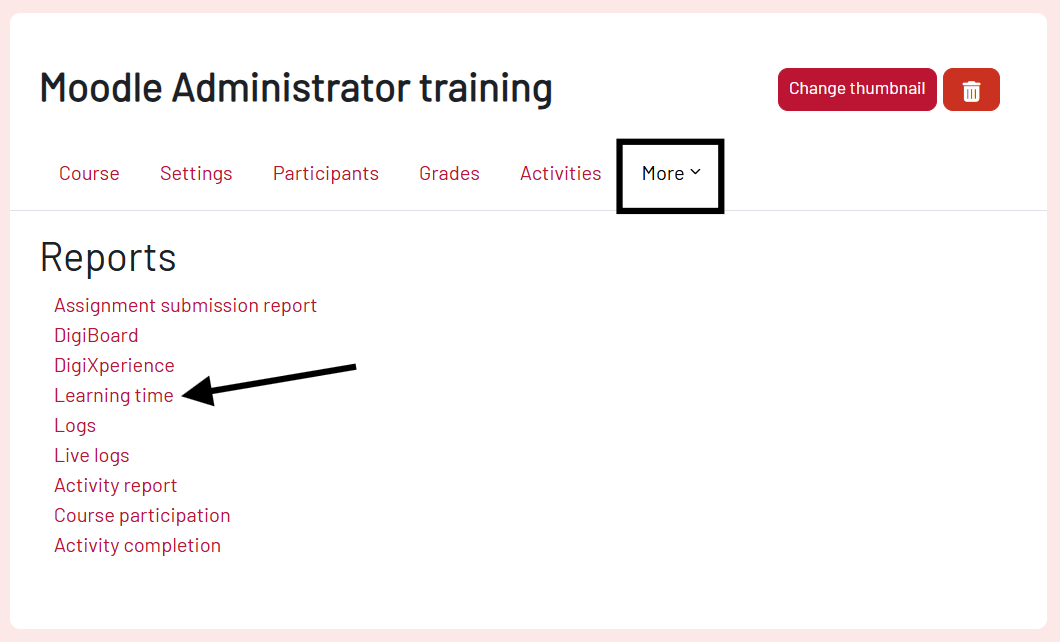
Once the plugin has been installed on the site, the ‘Learning Time’ tab appears in the list of reports available for each course.
Step 1. Go to the course of your choice, then to the ‘Reports’ tab
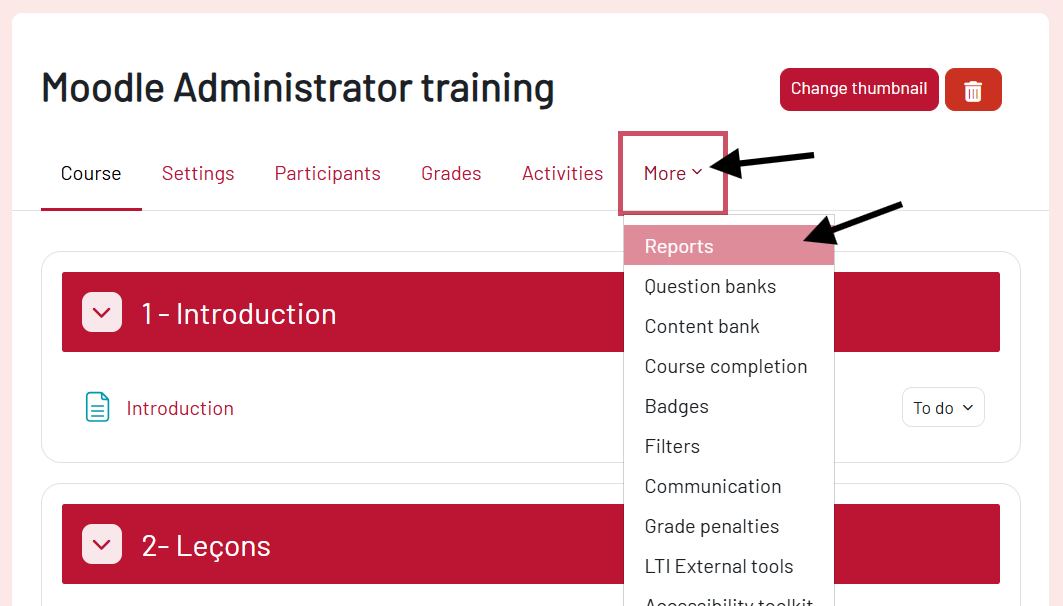
Step 2. Click on ‘Training time’.
You will be taken to the ‘Students’ tab, which shows all the students enrolled in the course, along with the time they have spent on the course and their progress.
If several student groups have been created, you can filter the results to see only the group of your choice.
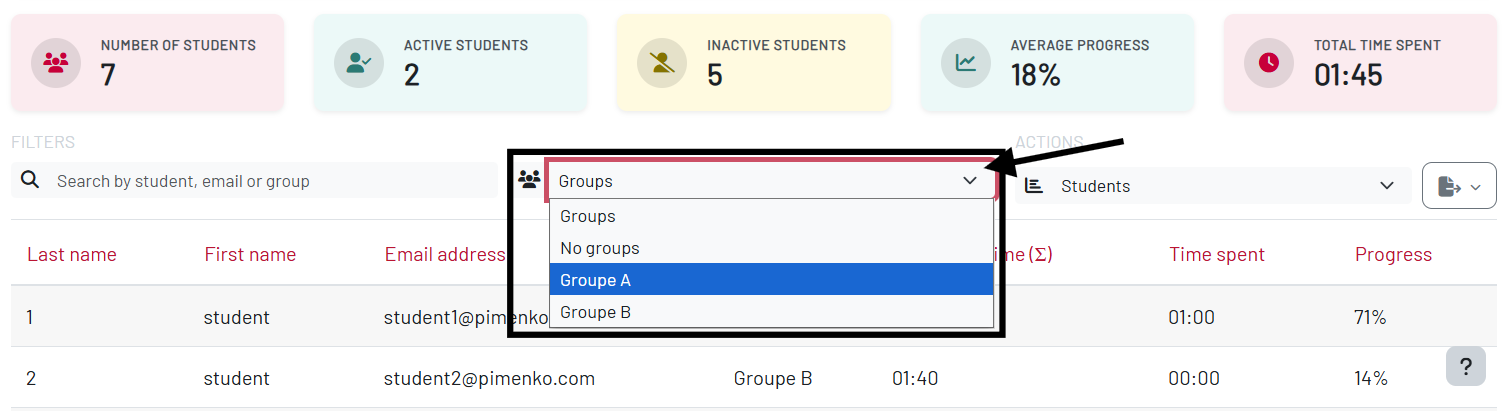
If there are several teachers on this course and you are only responsible for one group, only the group you are part of will appear in the report.

Step 3. Select the ‘Activities’ tab.
Step 4. In the ‘Estimated time’ column, there is an edit button next to each activity, allowing you to enter the time of your choice (in minutes). Press the ‘Enter’ key on your keyboard to confirm your entry.
Conclusion #
LearningTime is designed for all educational institutions and training organisations that wish to measure and make the most of their learners’ study time.
Whether you are a vocational training organisation subject to reporting requirements, a school or university wishing to track your students’ engagement, or a business looking to measure the effectiveness of its e-learning courses, LearningTime offers you a simple, reliable tool that is fully integrated with Moodle.
In just a few clicks, transform your course into a transparent tracking system that benefits both trainers (who have access to a clear dashboard) and learners (who see their progress recognised).


