The Moodle Marketplace is launching this week. At MoodleMoot France 2026, we presented on the topic with Marion Bret from Moodle HQ and shared our experiences as the first developers to submit paid plugins there. Here’s what was said, and what that means in practice if you manage a Moodle platform or develop plugins.
What the Marketplace Is Changing, and Why Now
The Moodle plugin repository has been in operation for more than fifteen years. More than 2,500 plugins, a global community, and a resource that has become indispensable. But its limitations are well known to anyone who uses it regularly: finding a relevant plugin takes time, obsolete or unmaintained plugins clutter the results, and there are no built-in commercial tools. No purchase, no billing, no payment.
The Marketplace addresses this. It is a one-stop platform for discovering, evaluating, purchasing, and installing Moodle plugins—both free and paid. It will be launched the week of July 13, 2026, and will replace the legacy directory at moodle.org. This isn’t just a like-for-like replacement—it’s the infrastructure the ecosystem has been waiting for for a long time.

For administrators, this mainly changes the way they find and evaluate a plugin. The information is standardized: compatibility, active maintenance, and security. Paid plugins must undergo an annual official review by the Moodle teams. Purchases are processed through Stripe, without going through an external website. For developers, this means the opportunity to sell directly, with visibility to a global audience and a level of credibility that the current directory could not guarantee.
Our feedback after submitting 5 plugins
This is the part we really wanted to share with future users—not the theory. We were among the first to submit paid plugins to the Marketplace by working directly with the Moodle teams. Here’s what we learned from this experience.
Overview of plugins on the dashboard
The Marketplace offers a unified management interface for all your plugins, both free and paid. This dashboard serves as the central hub: it lets you see at a glance the status of each submitted plugin, its review status, and its visibility on the Marketplace. That’s also where everything is managed, from the initial submission all the way through to publication.
Example of a dashboard for managing paid and free plugins
Configuring Your Plugin
The Marketplace has an interface for adding information that users will see on your plugin’s listing page.
When a user visits your plugin’s page, they’ll find information similar to what’s listed in the plugin directory: description, screenshots, compatibility, and reviews. The main difference: the addition of a ” Pricing ” tab for paid plugins, which shows details of the available plans.
A few limitations to note: the editor does not yet support embedding videos. Take care when taking screenshots—they make all the difference on the product page.
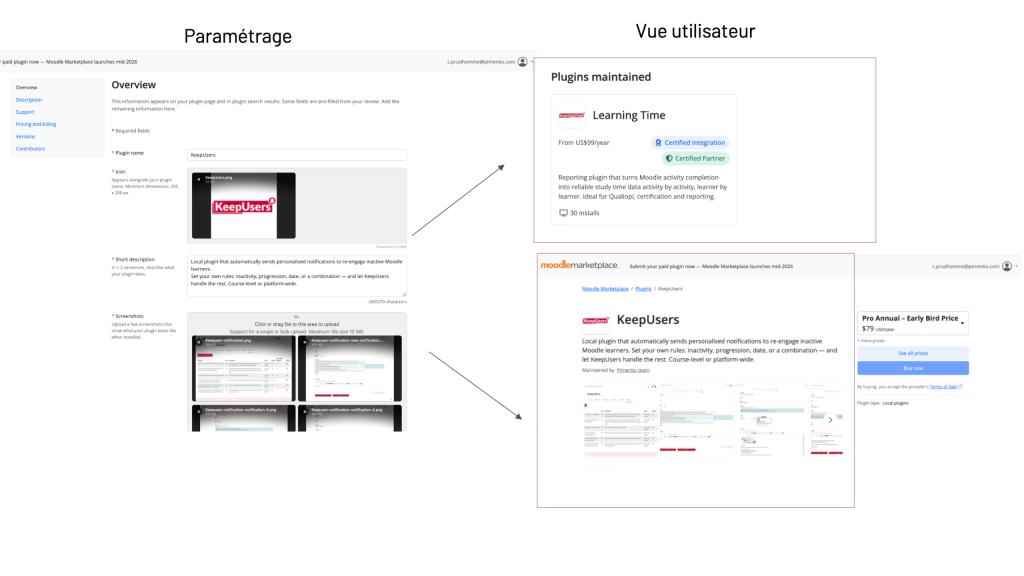
On the left are the plugin settings, and on the right is the user view of the Moodle Marketplace
Example of a plugin page on the new Moodle Marketplace
The review process is rigorous and serves as a guarantee of quality
The first thing to know is that on the Marketplace, paid plugins are reviewed internally by teams at Moodle HQ, not by external parties as was the case with the legacy directory. This is not a one-time review at the time of submission: paid plugins will be subject to an annual review. A level of commitment that the classical repertoire did not require.
The process goes through several stages that you can view on your dashboard:
- Automated testing in progress: The Marketplace first runs a series of automated checks on your code.
- Submitted for review: Your plugin is in the queue, awaiting a Moodle reviewer.
- Under review: A member of the Moodle team is reviewing it. Communication takes place via a dedicated Jira ticket, which makes it traceable and precise.
- Review completed: Your plugin has passed the technical review.
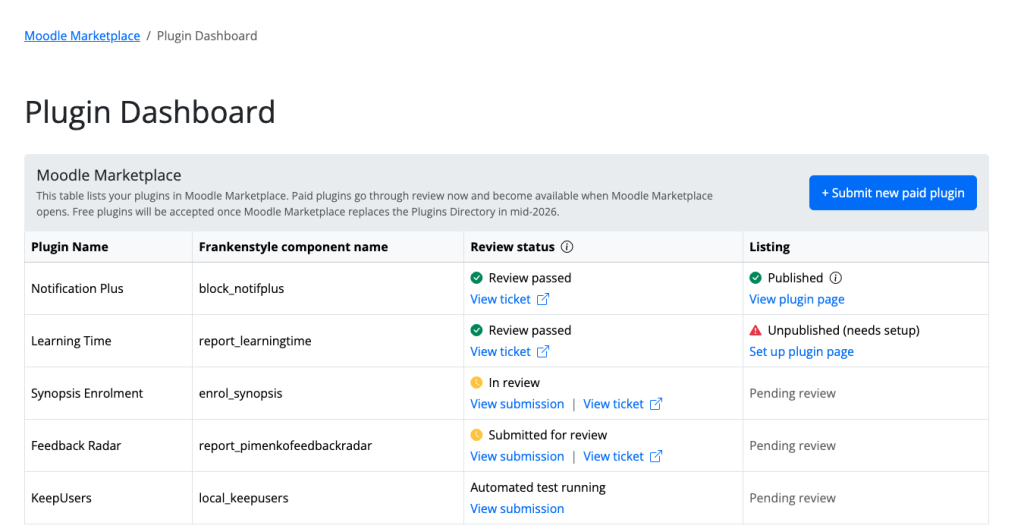
The different statuses for a plugin. From bottom to top: Keepusers is undergoing automatic validation; Feedback Radar is awaiting review by a member of the Moodle HQ team; Synopsis Enrolment is under review; Learning Time has been validated but not yet published; Notification Plus has been validated and published.
Note: Publication is not automatic once the review is complete. There’s one more step left: finalizing the plugin’s public page (descriptions, screenshots, pricing, etc.). Until this is done, the status in the dashboard will show “Unpublished (configuration required).” Once everything has been filled out, the plugin changes to “Published” and becomes visible on the Marketplace.
In practice, we observed that our five plugins went through these stages at different rates, depending on their readiness at the time of submission. In any case, the plugin dashboard lets you effectively keep track of everything from one place.
Technical Points to Keep in Mind
The Code Checker and the Moodle PHPdoc Check are very useful, especially if you don’t work on Moodle all year round. There are a few points that come up regularly in review feedback to developers and deserve special attention:
First, the Privacy Provider: even if your plugin doesn’t collect any personal data, its absence is flagged as a blocking issue. This must be explicitly stated.
Next, the copyright notice: it must appear in every file, using the correct syntax. It’s a small detail that unnecessarily delays publication when you forget it.
Behat tests and unit tests: For paid plugins aimed at an international audience, functional tests are not optional if you want to ensure long-term sustainability and maintainability. Include them in the very first version of your plugin.
A tip: Focus on one or two versions of Moodle to start with, rather than trying to cover too much ground. For example, it may be appropriate to choose Moodle 4.5 and 5.2. Be sure to include the URL for your plugin on GitHub or a similar platform when submitting: even if your repository is private (such as on GitHub), this information is required on the form.
The Sales Side: New Habits to Adopt
Monetization is handled through Stripe Connect. The first thing to check before anything else: Is Stripe available in your country? This is not universal, and it is an issue that could derail the entire process down the line.
Prices are in U.S. dollars. Three possible pricing models: fixed annual price, monthly subscription, or tiered pricing. There is no required format, but you must have a clear answer before submitting.
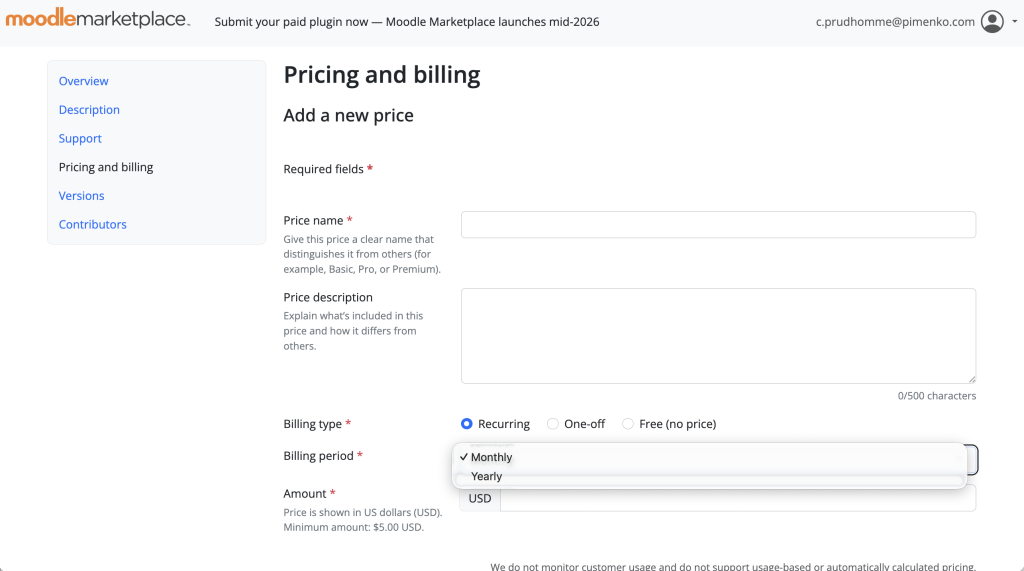
Another point to keep in mind for a plugin that offers both free and paid plans: it must be submitted as a “paid” plugin. That makes sense, but it has implications for how it appears in search filters. Keep this in mind when communicating.
The terms and conditions of sale must comply with the rules established by Moodle HQ. This isn’t just a formality: take the time to prepare them thoroughly.
A key point that many developers don’t anticipate: the Marketplace does not manage licenses. It records transactions, but you’ll need to set up access management (who purchased which plan and when) on your end using the Stripe API. It’s not a deal-breaker, but it’s something to keep in mind before launching your plugin.
One final note regarding organization: the Marketplace dashboard automatically links plugins to the “lead maintainer” listed on moodle.org. If you have older plugins in the plugin directory that need to be migrated, use the same email address. Otherwise, your existing plugins will not appear in the new Marketplace.
Why Pimenko Chose to Launch on the Marketplace as Soon as It Opened
We’ve been asked this question several times. We’ve been offering free plugins from the very beginning, and our plugins on moodle.org are used on more than 5,000 sites worldwide: why switch to a paid version?
It’s a matter of sustainability. Generating revenue from paid plugins allows us to do several concrete things: fund the maintenance of our free plugins, significantly increase the number of plugins we can offer, and maintain a level of quality and responsiveness that we wouldn’t be able to sustain with a broader range of plugins.
There is also a customer-side argument that we believe the Marketplace fully supports. A Pimenko plugin starting at $59 per year provides access to useful features at a price that most organizations can afford without having to make difficult trade-offs. And thanks to economies of scale, the more users there are, the more we can invest in the plugin’s quality and lifespan. It’s a win-win situation.
Finally, there is a commitment to quality that we embrace. Going through Moodle’s official review process means committing to standards. We’ve been doing this for a long time in our internal development projects. The Marketplace formalizes it and makes it visible.
The Marketplace will replace moodle.org. It’s best to get started now, help shape the platform, and take advantage of the launch benefits—including reduced transaction fees for the first year and visibility through the Edit Mode newsletter, which reaches more than 100,000 Moodle users.
Five plugins are available at launch: LearningTime, KeepUsers, Feedback Radar, Notif Plus, and Enroll Synopsis. All of them have reviewed Moodle.
Take a look at our plugins
All Pimenko plugins on the Moodle Marketplace