Design and Customization of Your Moodle Platform
Moodle has long suffered from a reputation for having a stark interface. This reputation dates back to the platform’s early years, when it was used primarily as a repository for course materials in academia. Over the past decade or so, the ecosystem has changed significantly.
Today, a well-designed Moodle platform can offer a user experience comparable to the best proprietary solutions while remaining open source, sovereign, and under your control. That’s what we’ve been doing for over 10 years, for organizations with very different audiences and use cases.
The Pimenko Theme
Our starting point for all customizations is the Pimenko Theme —a child theme of the official Moodle Boost theme, available for free on GitHub (github.com/DigiDago/moodle-theme_pimenko).
It’s a child theme, which means two things in practice. First, it automatically benefits from the ongoing updates and improvements to the Boost parent theme, which is maintained by the Moodle development team. Second, it is designed to be scalable: adding features or modifying its behavior does not require rewriting the existing code.
Its flexibility allows you to customize every visual and functional aspect of your platform: color scheme, fonts, course layout, home page, dashboard, catalog, and login page. Everything can be customized to match your brand guidelines without compromising the code’s long-term maintainability.
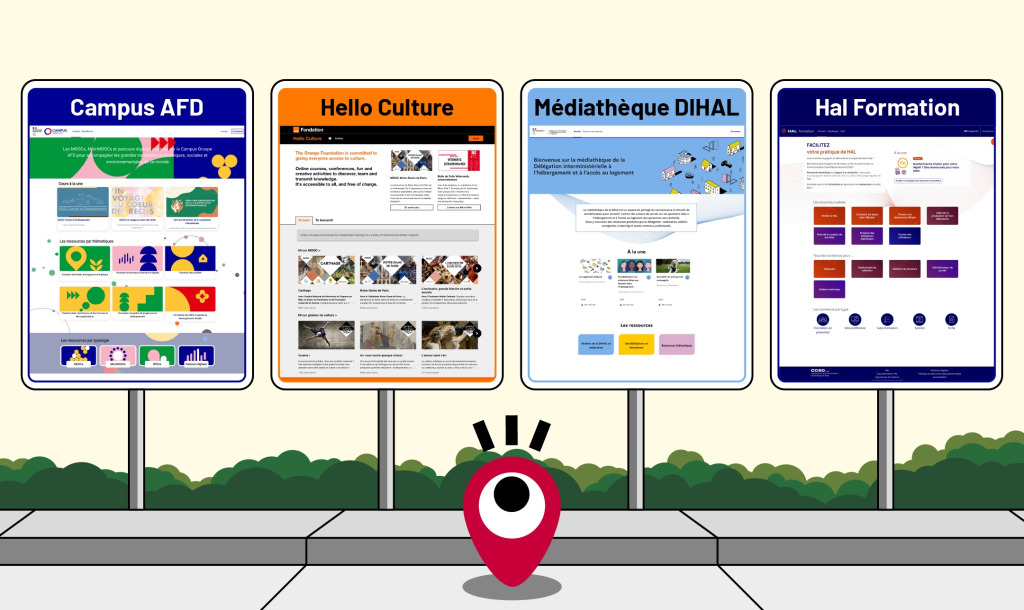
Orange Foundation (Hello Culture), AFD (Campus AFD), DIHAL, CCSD (HAL Formation): all of these are Moodle platforms that bear little resemblance to their original setups.
Our Customization Process
A Moodle design project follows several successive stages, each of which concludes with a deliverable approved by your teams.
-
UX Design and Mockups
We work on information architecture and user experience: navigation paths, content hierarchy, and catalog usability. Itineraries or interactive mockups are created for approval before moving on to implementation. This saves time and reduces costly back-and-forth during the development phase.
-
Artistic Direction
Our in-house graphic design studio handles all visual design work: adapting your brand guidelines to the Moodle environment, designing course thumbnails, banners, and educational illustrations. The goal is to ensure visual consistency between your platform and your other communication materials.
-
Integration and Development
The Pimenko theme is configured and designed to incorporate your visual identity across all pages: home page, dashboard, course catalog, course page, and login page. Additional plugins are enabled based on your educational and editorial needs.
-
Accessibility Testing
We ensure RGAA compliance at both the technical and educational levels: best practices in development, design, and writing; as well as automated and manual testing using screen readers (NVDA, JAWS, VoiceOver on macOS).

Responsive design
All of our customizations are designed to work on all devices: desktop computers, tablets, and smartphones. For audiences, a significant portion of whom access training via mobile devices (particularly on international platforms), this is a non-negotiable requirement. The Pimenko theme natively supports responsive design. The plugins we develop and integrate follow the same principles. We can also develop a mobile app for your project.

Ready to transform your Moodle platform?
If you’d like to update the look of your Moodle platform, redesign your homepage, or develop a new visual identity, please contact us.