Transform the look of your Moodle courses into an intuitive visual gallery
SoftCourse remplace l’affichage liste standard de Moodle par des cartes visuelles animées. Chaque section devient attractive, avec image, progression et accès direct au contenu — sans aucune ligne de code. Gratuit et open source.
Obtenir Softcourse sur la Moodle Marketplace
🐣 Gratuit pour toujours !
💬 Support inclus avec la licence
Complete documentation available
Moodle 3.5+
and later versions
Compatible with Moodle 5.1
latest version
Responsive
mobile – tablet – desktop

Your Moodle course looks like a list of links. Not just one training session.
By default, Moodle displays a course’s sections as a vertical text list. It’s functional, but not very engaging, especially for learners who are used to modern interfaces. As a result, the courses seem austere, navigation is not very intuitive, and learners don’t get a clear visual sense of what to expect.
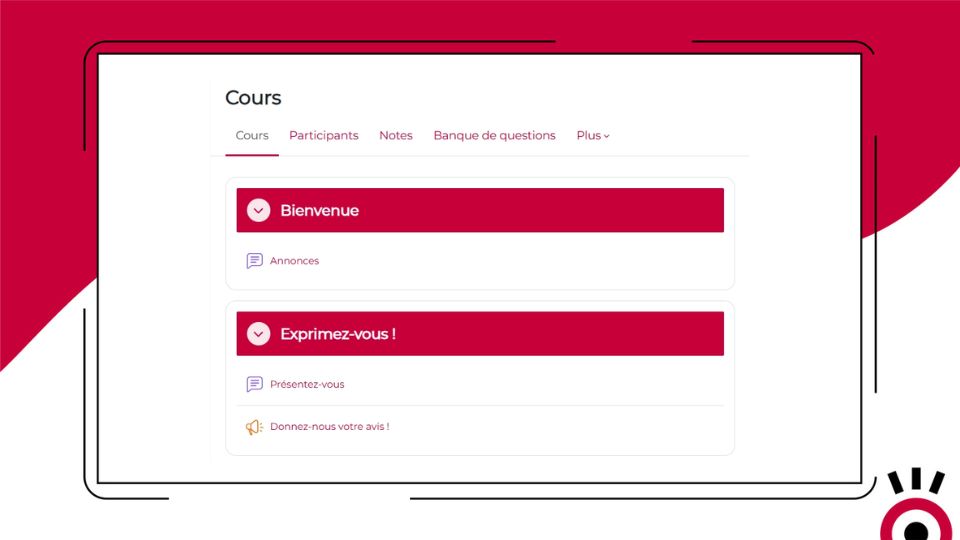
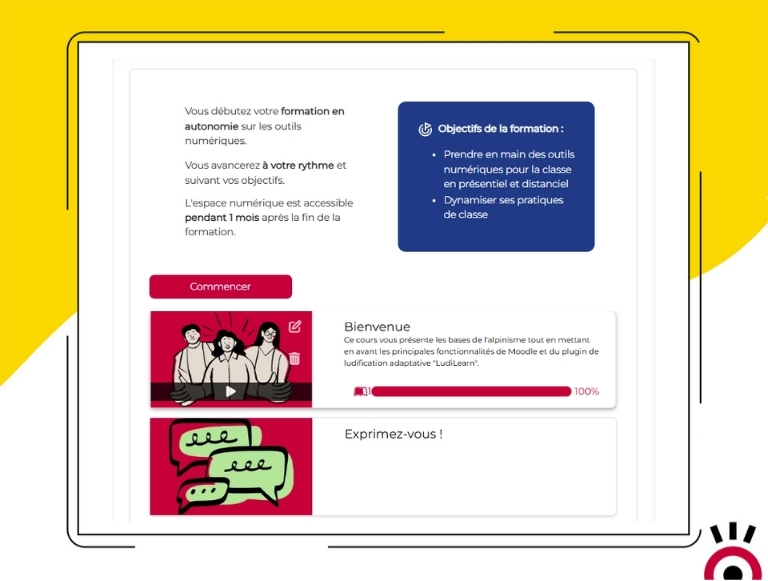
The solution: SoftCourse turns each section into a visual map in just a few seconds.
Enable SoftCourse in the course settings, and the change takes effect immediately. Your sections become engaging cards with customizable images, hover animations, a progress bar, and direct access to content. No further development, no changes to the theme.
Everything SoftCourse Does
-
Sections displayed as animated visual maps
Each section of the course appears as a card with smooth animations when you hover over it: shading, a play icon, and progress information. A modern visual experience that makes you want to explore the content.
-
Customizable images by section
Teachers upload and manage an image for each section directly in edit mode. If the image does not fill the entire card, it is displayed on a colored background based on the platform’s color scheme.
-
Progress Visible When Hovering Over
The number of activities and the completion percentage for each section appear when the learner hovers over the map. An immediate visual cue to see where he stands.
-
Quick Start Button
A “Get Started” button on the course homepage allows you to access the content immediately, without having to navigate through the list of sections. Each card is also clickable and links to the first activity.
-
Customizable button text
The text on the “Start” button can be changed in Moodle’s language settings. Adapt it to your situation: “Start,” “Resume,” “Join the class.”
-
Customizable introductory text
Add an introductory text at the top of the course page to provide context for the course, outline the learning objectives, or welcome learners on their first visit.
-
Hiding Sections for a Guided Tour
Hide all sections on the home page and require users to enter via the “Get Started” button—ideal for linear courses, beginner audiences, and short modules that must be completed in a specific order.
-
Fully responsive design
SoftCourse automatically adapts to computers, tablets, and smartphones. The visual experience remains consistent regardless of screen size.
-
Compatible with all Moodle themes
SoftCourse works with Moodle’s standard themes (Boost and its derivatives) and integrates seamlessly with the native course navigation. No theme modifications are required.
- Accès complet à toutes les fonctionnalités
- Toutes les mises à jour incluses
- Support via tracker
- Compatible Moodle 3.5 & et version suivante
Download SoftCourse for free
Get it on the Moodle Marketplace – freeIs LudiLearn really free?
Do you need technical skills to use SoftCourse?
No. SoftCourse can be enabled with just a few clicks in the course settings, just like any other Moodle course format. Images and options are managed directly from the standard editing interface.
Can I use SoftCourse with my existing Moodle theme?
Yes. SoftCourse is compatible with standard Moodle themes (Boost and its derivatives). If you’re using a highly customized theme, please contact us via the Pimenko tracker to check for compatibility.
Does the plugin work if some sections don't have images?
Yes. If no image is added to a section, the map is displayed with a colored background based on the platform’s primary color. The display remains consistent and clean.
Can we hide certain sections and display others?
SoftCourse offers two hiding options: hide all sections (guided tour) or hide only the general section (Section 0). These options apply to the entire course.
Is SoftCourse compatible with Moodle 5.1?
Yes. SoftCourse is compatible with Moodle 4.5 and all later versions, including Moodle 5.1.
Is SoftCourse really free?
Yes. SoftCourse is an open-source plugin developed and maintained by Pimenko. It is available for free on the Moodle Marketplace and on GitHub.