Moodle 5.3 at a glance: released on October 5, 2026; LTS version with security updates through October 2029. Key new features: Previous/Next navigation between activities, redesigned course page, dark mode (to be enabled by the administrator), learning objectives, collaborative grading, and Claude as the native AI provider. The Classic theme is being phased out. Can be updated from Moodle 4.4; requires PHP 8.3 or higher.
That’s it! Moodle 5.3 was released on October 5, 2026, during the week of the MoodleMoot Europe in Barcelona, which we attended. This new version is an LTS (Long-Term Support) release that will receive security updates through October 2029.
LTS versions are often the ones chosen by organizations looking for a stable version that will last for several years.
There are numerous UX-focused improvements, new educational features (collaborative assignment grading, the introduction of learning objectives, etc.), and more technical updates.
At Pimenko, we once again took the time to test Moodle version 5.3 on our development platforms using actual courses. As with Moodle 5.2, we invite you to explore the new features you won’t want to miss, organized by user role: what’s new for everyone, for instructors, for administrators, and for Moodle developers.
Given how feature-rich this new version of Moodle is, the goal isn’t to tell you everything, since the official documentation does a great job of that . So in this new article, we’re highlighting what matters most to us about this update.
And if you’re still on Moodle 4.5 LTS, 5.3 is your next logical step. It includes everything that’s been released since version 5.0, so there’s plenty to prepare for. We’ll come back to this at the end of the article.
What Moodle 5.3 Changes in the Interface for Everyone
Let’s start with what all your users will see as soon as the update is released. In the article on what’s new in Moodle 5.2, we mentioned the “linear navigation” project and the twenty or so tickets that were laying the groundwork for it. With Moodle version 5.3, the project is coming to fruition, and the entire interface has been redesigned. If you’re using Moodle’s official “Boost” theme or a child theme, you’ll see these new features on your site soon.
Previous / Next: to navigate between activities
This is one of the most noticeable changes for all users. The ” Previous ” and ” Next ” buttons are located in a fixed footer at the bottom of each activity and resource. The learner progresses through the course without returning to the course page between activities.
The rollout covers virtually all features: Quizzes, Assignments, Forums, Lessons, SCORM, H5P, Glossaries, Databases, Books, Wikis, Workshops, Feedback, resources… And a few adjustments come with it:
- The button for manually completing activities has been moved to this same footer. The learner marks the activity as complete and moves on to the next one with a single action.
- The Forum feature now includes a “View all discussions” link in the footer.
- The Forum feature also includes buttons that let you navigate from one conversation to another without having to go back to the main page.
- Activities that already had their own navigation (Lesson, SCORM, Feedback) hide it when linear navigation is active, to avoid duplication.
Important note: Linear navigation is enabled by default in the “Custom Sections” and “Weekly” formats, including for existing courses after the update. The teacher cannot disable it for their class. This is a deliberate choice made by MoodleHQ; only the administrator can disable it, on a course-by-course basis.
Our message to Pimenko
We’ve been offering this type of navigation with our Pimenko theme for several years. We believe that this new way of navigating represents real progress for the sequential learning paths found in most of the training programs we support or develop.
Course Page: A Clearer, Better-Structured Interface
The course page has been completely redesigned. It uses a centered layout, which is easier to read, with a clear hierarchy between sections and activities.
- Drawers: The course index drawer and the notebook drawer have been redesigned and their heights adjusted. They no longer cover the header. The activity maps are more clearly defined, and the shadows have been simplified in favor of structural grays. The result is cleaner and more visually understated.
- “Collapse All / Expand All” has been moved out of the “General” section and is now easier to find when browsing through long courses.
- Activity reports: In the overview and on the keyboard, the reports are separate. This represents a real improvement in accessibility for keyboard navigation—an issue that matters to all our public-sector clients subject to the RGAA.
Dark mode: available, but requires careful activation
It was the ticket that had received the most votes from the community in years. Dark mode is coming to the Boost theme and any theme that has been optimized for Moodle 5.3.
Once enabled by the administrator, the user can choose between three modes from the navigation bar: Light, Dark, or System (which follows the computer’s or phone’s settings). The switch happens immediately, without reloading the page.
Dark mode is turned off by default. It is up to the administrator to enable the feature in Site Administration > Layout > Themes > Boost under the “Experimental Settings” tab. The administrator also selects the default mode.
Why is this an “experimental” setting? The impact on the ecosystem is significant, particularly for third-party plugins: a plugin that has not been verified—or adapted if necessary—will continue to display light-colored pages in the middle of a dark interface. The same applies to themes that are heavily customized or that do not follow Moodle development best practices.
We recommend that you enable dark mode on a pre-production platform to quickly review your courses, plugins, and theme and assess the discrepancy, which may be more or less significant.
New UX Features That Bring a Lasting Modernization to the Interface
- New font in the Boost theme, with additional fonts available in Moodle.
- The global search remains visible in the navigation bar, including on mobile devices. And now she’s finding the beginnings of words: searching for “Veg” brings up “Vegetarian.”
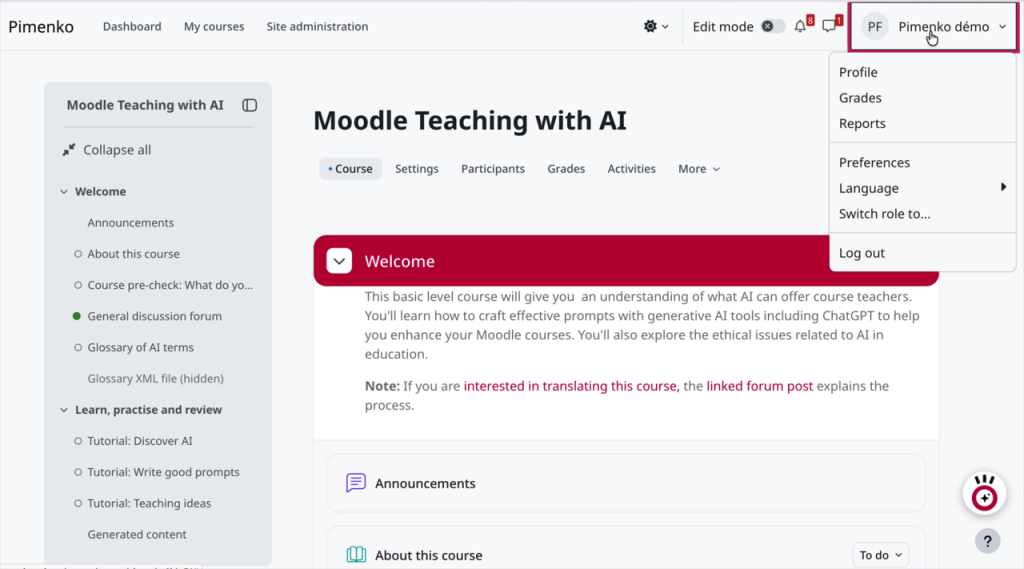
- The user’s name appears next to their avatar, and the notification and message icons have been redesigned.
- A progress bar appears while files are being sent. No more uncertainty when faced with a homework submission that seems stuck.
- The login page now includes help icons, and the custom image is centered.
What’s New in Moodle 5.3 for Instructors
Whether you’re designing courses, evaluating learners, or leading activities, this version offers several significant new features.
The theme chosen by MoodleHQ for version 5.3, “Learning with intent,” is reflected primarily in two areas of focus: learning objectives and collaborative grading.
Learning Objectives: Link what we want students to learn to what we assess
Regular Moodle users will remember the “Objectives” feature carried over from earlier versions—a powerful feature that was rarely used because it was difficult to get the hang of. Moodle 5.3 brings it up to date with a redesigned core.
Specifically, you can:
- Create learning objectives at the site level (shared across your entire Moodle platform) or at the course level.
- Incorporate them into activities, such as an assignment or quiz, and then track the learners’ progress in the gradebook (evaluator’s report, “Objectives” report).
- Create objectives without a rating scale to describe a targeted skill or piece of knowledge without assigning a score.
- Find all the course objectives and related activities on a dedicated page under Courses > More > Learning Objectives.
- Preserve them during course backups, restores, imports, and exports.
You can enable this feature under Site Administration > General > Advanced Features.
Why is this important? Explicitly linking learning objectives to assessments is what competency-based approaches in higher education and adult education call for. It also serves as a traceability tool for certified training organizations (for example, those certified under Qualiopi in France). Moodle provides a solid foundation here.
Collaborative Grading: Each Grader Has Their Own Voice
Moodle 5.2 paved the way for multi-grader grading (we showed you the entire process in a video in our 5.2 article). Version 5.3 delivers phases 2 and 3 of this project.
- Feedback from each reviewer: Each reviewer provides their own feedback (comments, files, PDF annotations) in addition to the overall feedback. The learner sees both.
- Mandatory or optional graders: You can add an optional grader for assignments that require additional feedback.
- Site-level limits: The administrator sets the maximum number of required and optional graders, as well as the default values for new assignments.
- An initial version of “sample marking” for multi-correction.
For exam committees, theses, and certifications, you can manage the entire process in Moodle without having to use a spreadsheet on the side.
Test Activity (Quiz): A due date is now available
Until now, Moodle’s test activity (often called a quiz) had a start date and an end date. Period.
Version 5.3 adds a due date in between. Learners can still take the quiz after the deadline, but their attempt will be marked as late until the quiz closes. The date appears in the calendar and timeline, and supports exceptions based on the user or group.
Other improvements to the Test (quiz) activity:
- The submission confirmation is clearer and more consistent: the learner knows exactly what they are confirming.
- The “Notes” and “Responses” reports now include filters by user, group, and name. Essential for courses with several hundred students enrolled.
- Safe Exam Browser: It allows up to three screens and screen captures, which opens the door to exam monitoring tools.
Question Bank: Housework Goes Faster
The question bank continues to grow with each new version. It hasn’t always been easy in recent years, with a few bugs that may have caused damage to the schools’ question banks. For example, we have seen academic Moodle platforms that have ended up with, in some cases, tens of millions of “useless” questions that needed to be cleaned up.
Things have generally returned to normal since the improvements in 5.2. Moodle version 5.3 therefore focuses on cleanup and sharing:
- Delete a category and all its questions in a single step. The questions used in a quiz are protected and must be moved.
- A toolbar at the bottom of the page for moving or deleting selected questions, with a confirmation window that appears without leaving the question bank.
- Export only the selected questions in Moodle XML format. This is a convenient way to share a set of questions with a colleague without having to export an entire category.
- The last category you used is selected when you add a new question.
TinyMCE: Accordions and Stylish Lists to Structure Your Content
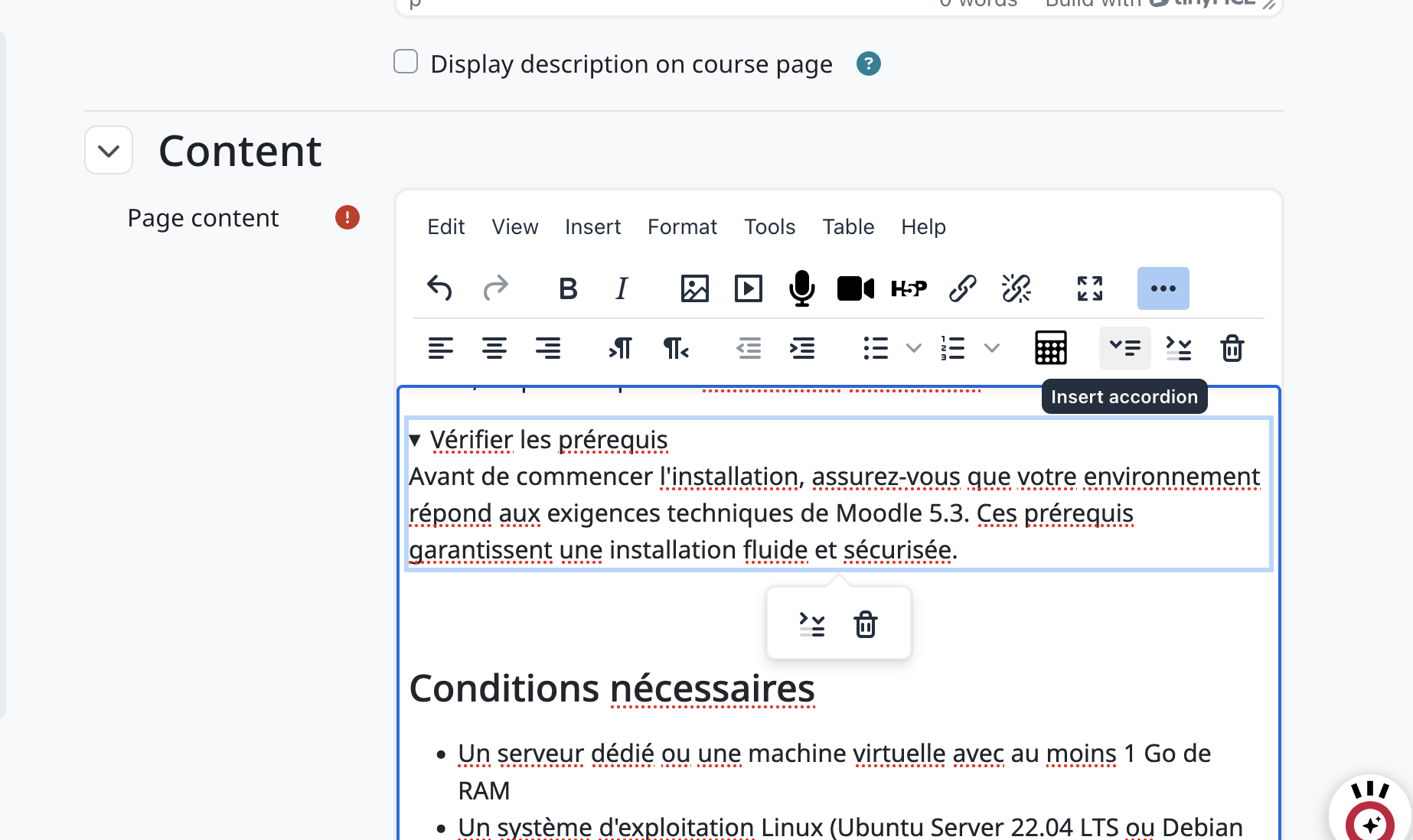
Two new open-source plugins are coming to the editor: accordions (collapsible sections) and list styles. Long-form content becomes easier to read without having to tinker with HTML. For sites subscribed to TinyMCE Premium, a plugin also allows you to paste Markdown, which is automatically converted into formatted content.
Assignment: Your profile fields in the grading table
Custom profile fields (student ID, class year, campus, etc.) are now displayed in the assignment grading table. A feature that saves a lot of time for teams that review large volumes of data.
Track Your Learners
- AI Usage Report by Course: Instructors can see how their learners are using AI features in their course (More > Reports > AI Usage) without needing administrator permissions. Each learner can view their own usage statistics from their profile.
- The course completion report can be downloaded in CSV, Excel, PDF, and other formats, with the filters applied.
- On the Participants page, an icon explains why a registration is “inactive”: registration has not yet begun, has expired, or the registration method has been disabled.
Our message to Pimenko
Learning objectives and collaborative grading are the two features that teachers and trainers should prioritize exploring. The other new features—including quizzes, the question bank, and the text editor—will make your day-to-day work run more smoothly.
What’s New in Moodle 5.3 for Administrators
For administrators, version 5.3 requires more preparation than version 5.2. There are two decisions to make before the update (the Classic theme and linear navigation), and several new features will save you time every day.
Important note: The Classic theme is being phased out
This is a major change for administrators who are still using it: the Classic theme has been removed from Moodle’s core. Sites that use it automatically switch to Boost when they are updated.
If your platform is still running on Classic, now is the time to switch to a modern theme. The four platforms featured in our article on Moodle customization demonstrate what can be achieved using a well-structured Boost framework.
Claude joins the ranks of native AI providers, and the use of AI is becoming evident in every class
Moodle’s AI subsystem continues to expand. Following Gemini and Amazon Bedrock in version 5.2, version 5.3 adds Anthropic Claude as a native provider. It is configured in Site Administration > > IA > > > Providers, where you select the model, and it supports text generation, summarization, and explanation.
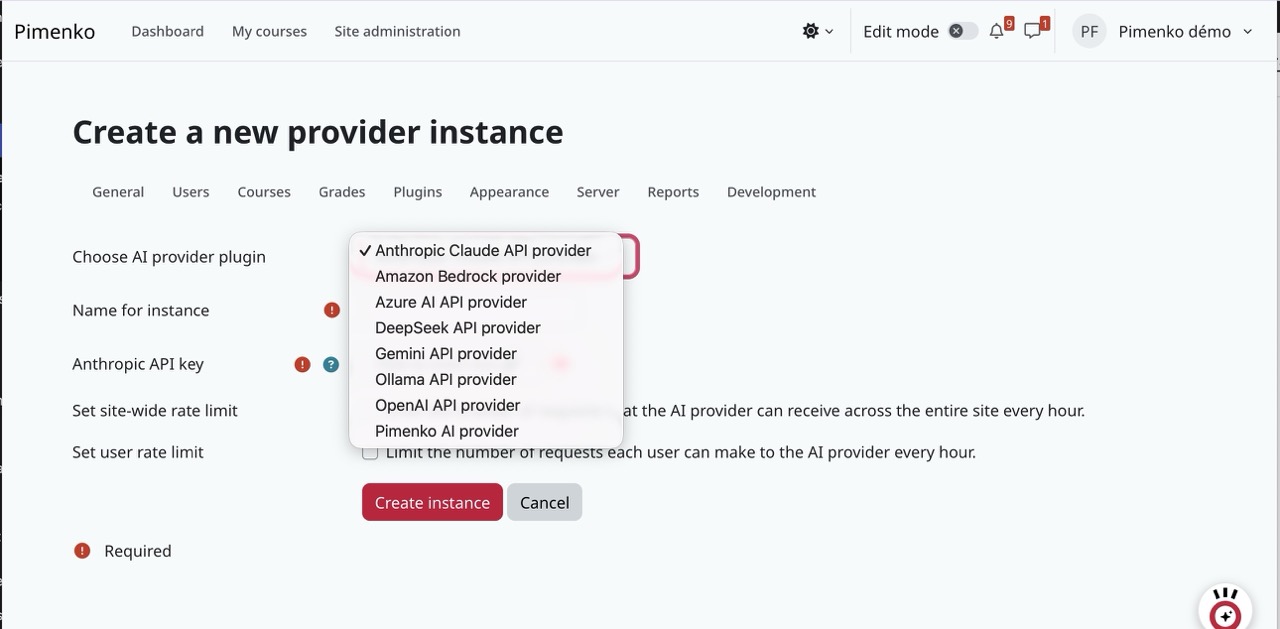
The second addition is just as important: the report on the use of AI in the course. With the European AI Act, transparency regarding the use of AI in educational settings is no longer optional. Moodle stays true to its philosophy: you choose your provider, you stay in control, and you can see what’s being used.
Roles: Risky Permissions Become Visible
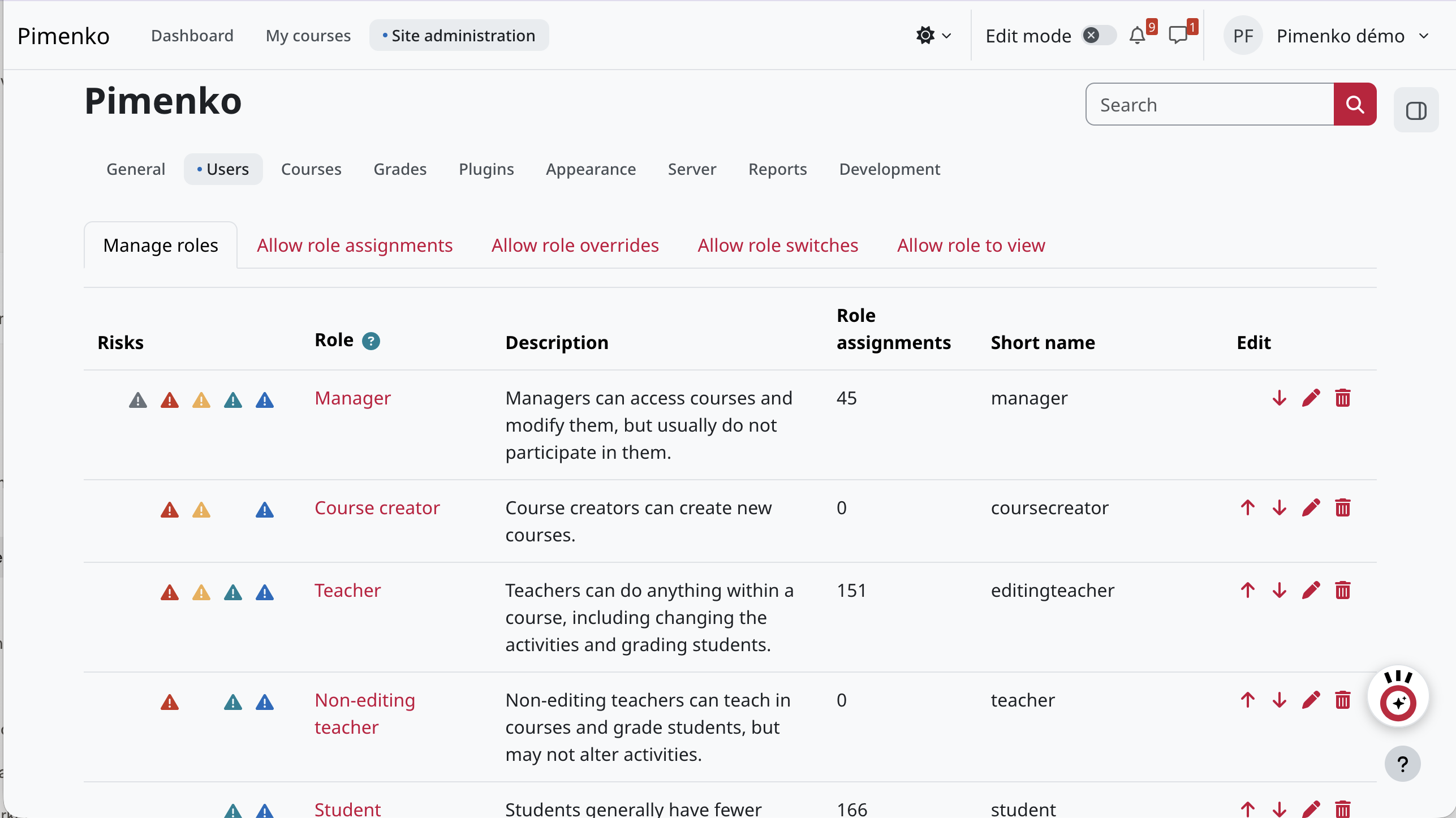
The list of roles now displays colored risk icons, sorted by severity, and the number of users assigned to each role. When you click on a risk icon, you’ll see only the capabilities of the role affected by that risk. For a security audit or a review of access rights, this makes things easier.
Similarly, new connection notifications are enabled by default on new installations, and a security check alerts the administrator if they are disabled. On updated sites, they can be enabled under Site Administration >, General >, Mail >, Notification Settings.
Resource-intensive background tasks: course deletion, scheduled tasks launched on demand
- Asynchronous course deletion: Once this setting is enabled, courses are deleted in the background, with no expiration delay. A “Pending Deletion” badge appears in the list. Useful for cleaning at the end of the academic year.
- Run a scheduled task as soon as possible: the task is queued and runs the next time cron runs, without the risk of the browser session expiring.
- Quiz statistics: A configurable recalculation interval reduces server load on platforms that experience high traffic during exams.
- Status, performance, and security reports: Results are displayed as they become available, without having to wait for all checks to complete. The environmental audit has been moved to the performance report.
Mobile app: automatic login, logo, and navigation settings
The settings related to the mobile app have been revised and reorganized.
Note: Automatic login from a deep link within the app must now be explicitly enabled in Site Administration > Mobile App > Mobile Authentication. If you use these links (in emails or notifications, for example), check this setting after the update.
- The site’s logo appears in the app’s header.
- New settings allow you to control how disabled features are displayed.
- For sites subscribed to the Premium app, an alert is sent when quotas are reached.
Our message to Pimenko
Two decisions to make before the update (Classic theme and linear navigation), one setting to check afterward (automatic login for the mobile app), and lots of small improvements that make administration easier.
What’s New in Moodle 5.3 for Plugin Developers
There are many things for developers to take into account. For changes, we refer to the official ticket on the Moodle tracker, where you can find the technical discussion, specifications, and commits.
AI Subsystem: Provider, Placement, Manager
A quick refresher on the architecture, because it explains why adding Claude (MDL-88674) was so easy. Starting with Moodle 4.5, the AI subsystem is based on three separate components:
- The provider (aiprovider_*): the connector to an external AI engine. It has no interface.
- The use case (aiplacement_*): the context in which the user uses AI (editor, course assistant, etc.). He doesn’t know what’s driving it.
- The manager (core_ai\manager): the conductor. Suppliers and investors never communicate directly with each other.
The result: Anyone can plug in their own engine or create their own AI experience without affecting the rest of Moodle. The Usage by Course Report (MDL-80893) is based on Report Builder. It is therefore important to work within this framework to take full advantage of all the AI features offered by the core Moodle platform.
In fact, this is the architecture we’ve implemented with PimenkoAI.
OAuth2 for Routed Web Services
Moodle’s new REST API now has its own authentication mechanisms: OAuth 2 clients registered in Site Administration > Server > OAuth 2 Clients, and personal access tokens that each user creates from their preferences (MDL-87706, MDL-88472). OAuth2 clients require the installation of the site’s Composer dependencies. It is an essential component for seamlessly connecting Moodle to third-party applications.
PHP Attributes, Symfony Console, Emails, and React
Moodle 5.3 opens up new possibilities for developers. In particular, we will note the following:
- Dependency injection using PHP’s native attributes, in addition to the existing \core\di system (MDL-89528).
- Symfony Console for writing CLI commands (MDL-85847).
- An API for filtering and modifying emails before they are sent (MDL-69724).
- A standard PHP API for mounting React components (MDL-89296). After laying the groundwork in 5.2, React is moving on to implementation: the Timeline block is the first component to be migrated (MDL-88287), and the primary and secondary navigation menus are being replaced with components from the Design System (MDL-89294, MDL-87830). The interface is also being updated to Bootstrap 5.3.8.
- The `extend_user_menu` hook has been improved (MDL-88938), and PHPUnit databases can now be backed up and updated to speed up continuous integration for plugins (MDL-88495).
Linear Navigation: The Exception Mechanism for Your Activity Plugins
If you are developing a Moodle activity plugin, linear navigation is relevant to you. An exception mechanism allows for handling special cases, such as an activity that already has its own internal navigation (MDL-87575, MDL-88604). Test your plugins with the fixed footer; that’s where display conflicts will show up.
Dark Mode: Check Your Plugins and Themes
Dark mode (MDL-68037) is based on the theme variables. Plugins that hard-code colors will display light areas in the middle of the dark interface. Behat tests can run in dark mode: take this opportunity to review your plugins. For course format developers (as is the case with Ludilearn and Softcourse), the new course page and linear navigation also require careful review.
The complete list is included in the developer release notes.
PimenkoAI: Moodle’s AI Architecture in Practice
At Pimenko, we don’t just follow developments in the AI subsystem—we build on them. PimenkoAI is an AI assistant natively integrated into Moodle, built exactly according to the provider/placement architecture described above, rather than as an external chatbot grafted onto the platform.
The solution is based on two GPL-licensed Moodle plugins: a front end (the discussion interface visible to the user, developed using components from the Moodle Design System) and a backend that connects to our AI infrastructure. The assistant offers several modes:
- Search: Find a course or resource using natural language.
- Creation: Develop an educational activity and integrate it directly into a course.
- Tutor: supporting a learner throughout their educational journey.
- Course or site administration: assist an administrator with specific tasks, always seeking confirmation before making any changes.
Our approach: PimenkoAI generates an activity, not an entire course, and the instructor remains the author of the course. And like any native feature, it adheres to Moodle’s governance mechanisms: permission checks, AI activation on a per-course and per-action basis, and full reporting to the Privacy API for the export and deletion of personal data. This is proof, on our own scale, that Moodle’s AI engine delivers on its promise.
Preparing for the Migration to Moodle 5.3
Technical Requirements
- Updates are available for Moodle 4.4 or later. If you are using an older version, an additional step is required.
- PHP 8.3 or higher (PHP 8.4 is supported), with the sodium extension and max_input_vars set to at least 5,000.
- PostgreSQL 17 and MariaDB 11.4 or later (two versions listed in 5.3). MySQL remains at version 8.4, and SQL Server at version 2019.
If you’re upgrading from Moodle 4.5 LTS, keep in mind that you’re implementing changes from three versions at once. Our articles on Moodle 5.1 and Moodle 5.2 detail the technical changes made in between releases, including code restructuring and subsections.
Here’s what we recommend you check to ensure you’re properly prepared for this update
- Classic Theme: Does your website use it? Do you have a theme that inherits it?
- Plugins: Are they compatible with version 5.3, particularly with linear navigation and dark mode?
- Dark Mode: Should You Enable It Now, or Wait Until You’ve Tested Your Plugins and Theme?
- Linear navigation: Should we keep it as is or disable it for certain formats?
- Safe Exam Browser: Review your exam settings with the new configurations.
- Mobile app: Re-enable automatic login via deep link if you use it.
- Communication: Notify your teachers and students of any visible changes.
And as always, it’s best to test this update on a pre-production environment using your actual courses and plugins.
Our Review of Moodle 5.3
Moodle 5.3 is an LTS release that lives up to its status.
From an educational perspective, the learning outcomes and multiple markers / marking workflows provide teams with tools designed to help them plan and assess in a systematic way. The quiz and the question bank continue to mature.
In terms of the interface, this version includes significant, fundamental changes: Previous/Next navigation, a redesigned course page, and dark mode. Your users will notice it, and overall, they’ll appreciate it.
From a technical standpoint, phasing out the Classic theme and raising the system requirements will require some preparation, but it’s nothing insurmountable. React, OAuth2, and the AI subsystem confirm that Moodle is heading in the right direction and will enable developers to create modern plugins.
Do you have courses with specific requirements, custom plugins, a Classic theme, or a server infrastructure that needs to be upgraded? Pimenko, a Moodle Certified Partner, can audit your platform and assist you with your migration to Moodle 5.3. Get in touch and let’s talk it through.
FAQ Moodle 5.3
Quelles sont les principales nouveautés de Moodle 5.3 ?
La navigation Précédent / Suivant entre les activités, une page de cours redessinée, le mode sombre, les objectifs pédagogiques, la correction à plusieurs évaluateurs, une date d’échéance pour les tests, et Claude d’Anthropic comme fournisseur IA natif.
Peut-on passer directement de Moodle 4.5 à Moodle 5.3 ?
Oui. La mise à jour vers Moodle 5.3 est possible depuis Moodle 4.4 ou une version plus récente. Depuis la 4.5 LTS, vous cumulez les changements des versions 5.0, 5.1 et 5.2, il faut donc prévoir des tests sur une préproduction.
Le mode sombre est-il disponible dans Moodle 5.3 ?
Oui, dans le thème Boost. Il est désactivé par défaut et l’administrateur l’active dans les réglages expérimentaux du thème. Chaque utilisateur choisit ensuite Clair, Sombre ou Système. Testez vos plugins et votre thème avant de l’ouvrir à tous.
Peut-on désactiver la navigation Précédent / Suivant ?
Pas au niveau du cours. Seul l’administrateur peut la désactiver, format de cours par format de cours, dans l’administration des formats de cours.
Que devient le thème Classic avec Moodle 5.3 ?
l est retiré du cœur de Moodle et les sites qui l’utilisent basculent automatiquement sur Boost. MoodleHQ n’y ajoutera plus de fonctionnalités.
Jusqu'à quand Moodle 5.3 est-il maintenu ?
C’est une version LTS : elle reçoit des correctifs de sécurité jusqu’en octobre 2029.